RocketMQ消息存储
消息储存架构
元数据管理
为了提升整体的吞吐量跟整体的可用性,RocketMq服务器一般会为单个Topic创建多个分区,就是在每个Broker主从集群里面维护部分分区(Partition), 也就是队列(MessageQueue)。同一个Broker主从集群中每个Topic的队列数相同并且从0开始编号,不同Broker主从集群中的消息队列数量可以不一样。
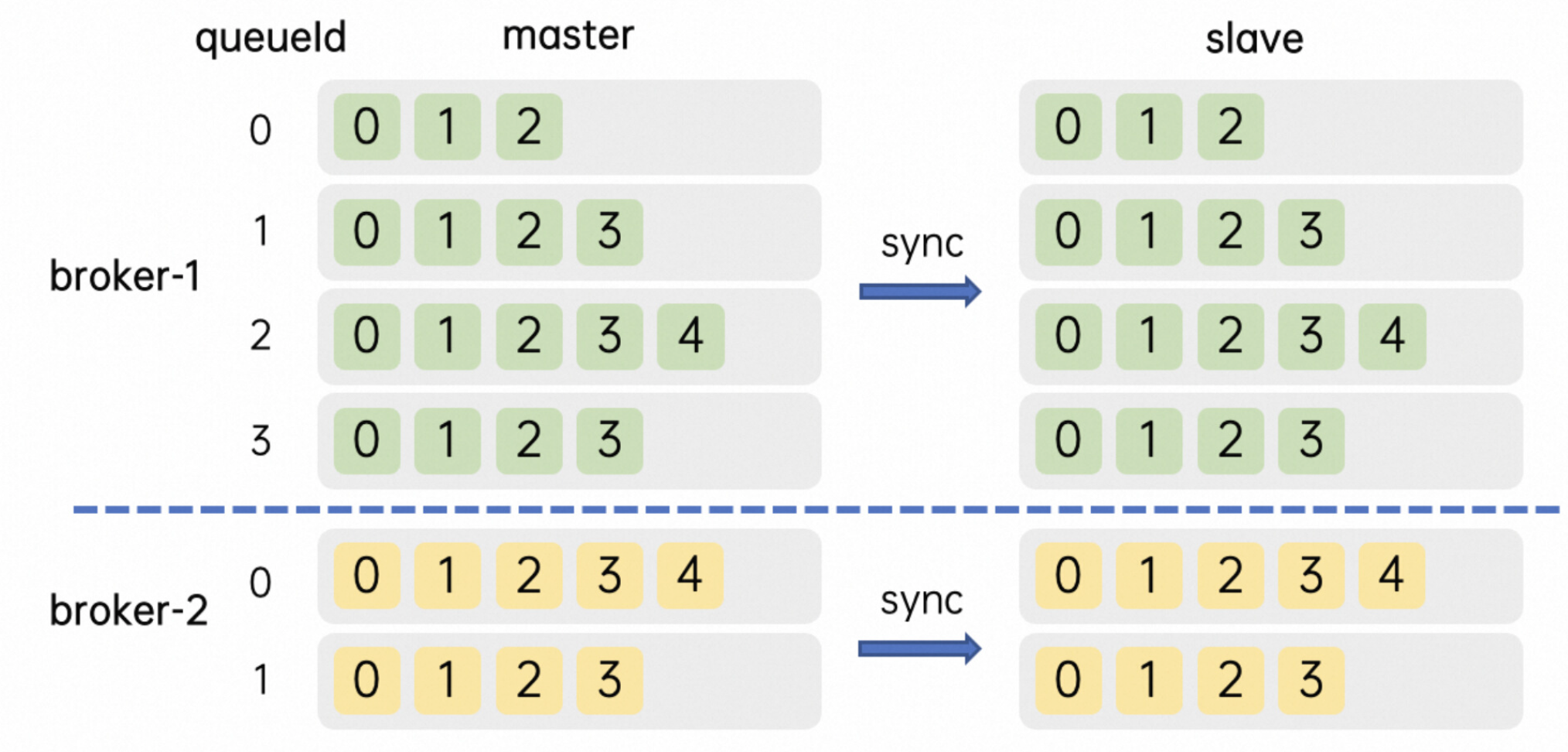
- 一个主题在Broker-1主副本上有4个队列,编号是0-3, 在Broker-1备副本上完全相同;在Broker-2上可能只有2个队列,编号是0-1
- Broker上元数据中每个Topic的配置包含了几个核心属性,名称,读写队列数,权限和其他元数据标识
- 队列从0开始编号,扩缩队列都在尾部操作,比如24个队列缩分区到16,会留下编号为0-15的队列
- Broker 还管理着当前节点上 Group 的相关信息和消费进度(位点),当消费进度更新时 并不会像 Topic Group 那样立刻持久化,而是使用一个定时任务做 CheckPoint。这个周期默认是 5 秒,所以当客户端有上下线,服务端主备切换或者正常发布时,可能会有秒级的消息重复,并观察到堆积量的短暂上升。
mmap文件存储
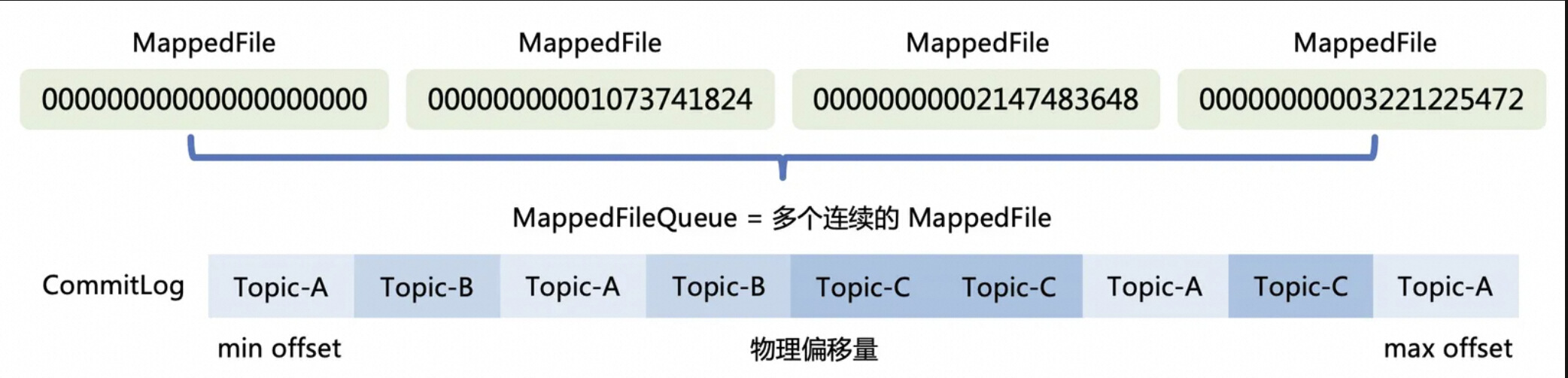
为了实现高效的写消息操作,RocketMQ使用顺序写盘的方法,通过append only将数据追加到文件末尾。利用NIO的FileChannel模型,通过使用偏移量的形式写入磁盘而不用read/write的系统调用,减少了数据在缓冲区之间拷贝的开销。但是这种实现机制有一些限制,单个mmap的文件不能太大(RocketMQ选择了1G),一旦超过这个这个容量,就会新建一个文件组成一个链表(MappedFileQueue),就可以用来存储消息了。
消息储存格式
RocketMQ 有一套相对复杂的消息存储编码用来将消息对象序列化,随后再将非定长的数据落到上述的真实的写入到文件中,存储格式中包括了索引队列的编号和位置。单条消息的存储格式如下:
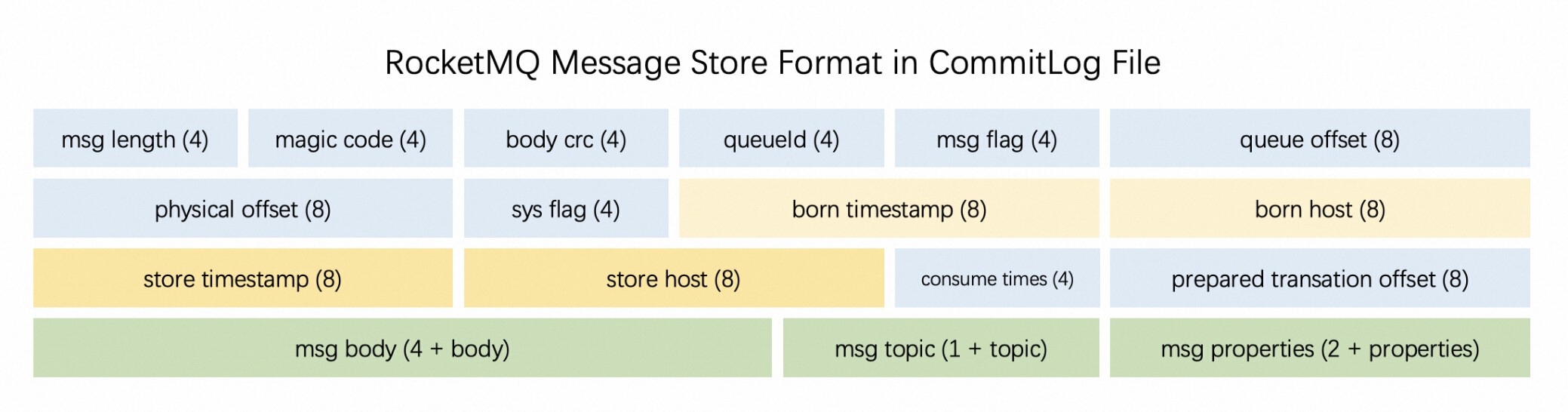
可以发现,单条消息本身元数据占用的存储空间为固定的描述信息和变长的 body 和 properties 部分,而消息的 payload 通常大于 2K,也就是说元数据带来的额外存储开销只增加了 5%-10% 左右。很明显,单条消息越大,存储本身额外的开销(比例)就相对的越少。
存储架构设计
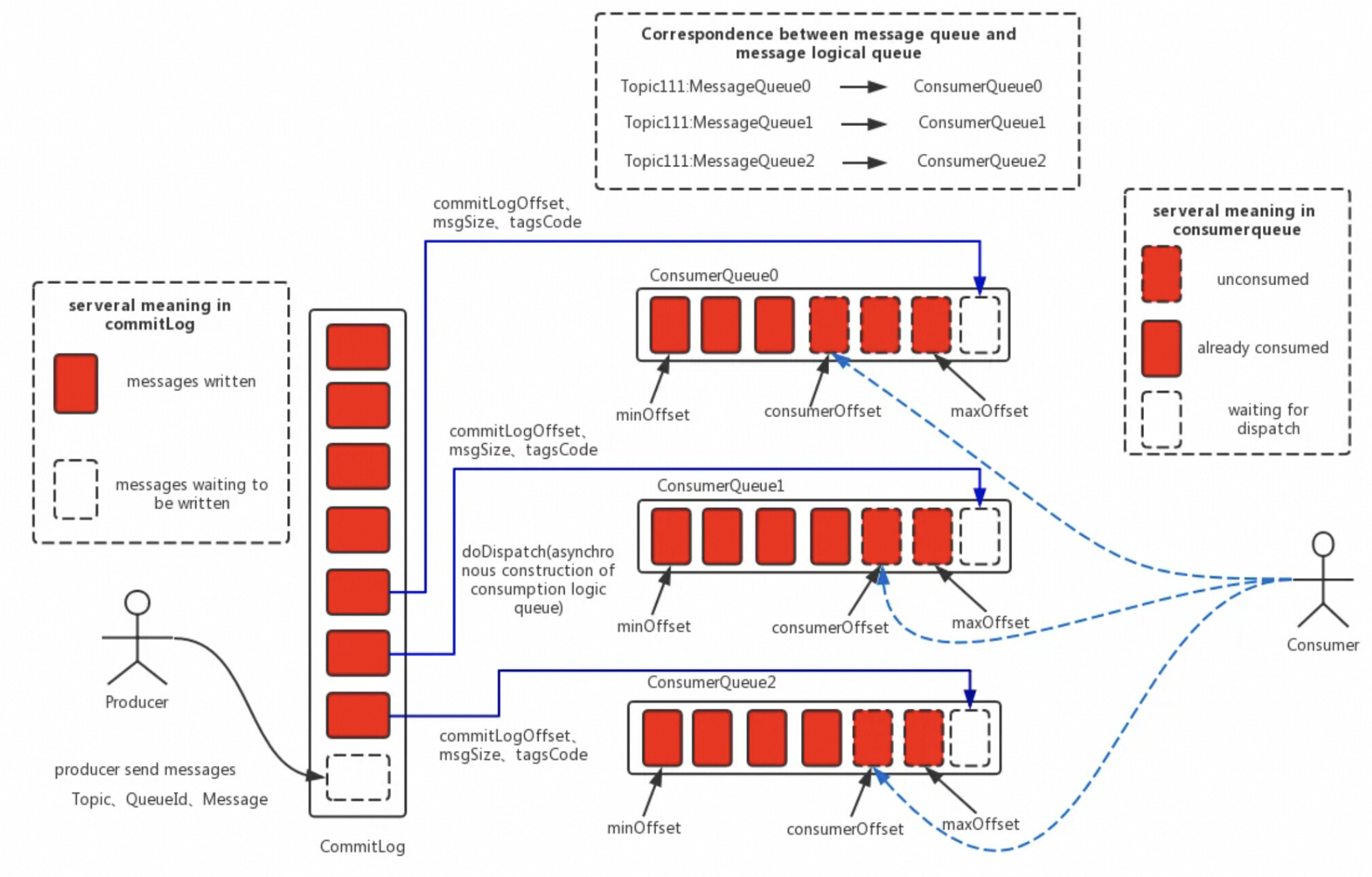
在数据写入 CommitLog 后,有一个后端的 ReputMessageService 服务 (也被称为 dispatch 线程) 会异步的构建多种索引(例如 ConsumeQueue 和 Index),满足不同形式的读取和查询诉求。在 RocketMQ 的模型下,消息本身存在的逻辑队列称为 MessageQueue,而对应的物理索引文件称为 ConsumeQueue。其中 dispatch 线程会源源不断的将消息从 CommitLog 取出,再拿出消息在 CommitLog 中的物理偏移量,消息长度以及 Tag Hash 等信息作为单条消息的索引,分发到对应的消费队列,构成了对 CommitLog 的引用 (Reference)。ConsumeQueue 中单条消息占用的索引空间只有 20B。当客户端尝试从服务端拉取消息时,会先读取索引并进行过滤,随后根据索引从 CommitLog 中获得真实的消息并返回。
索引架构设计
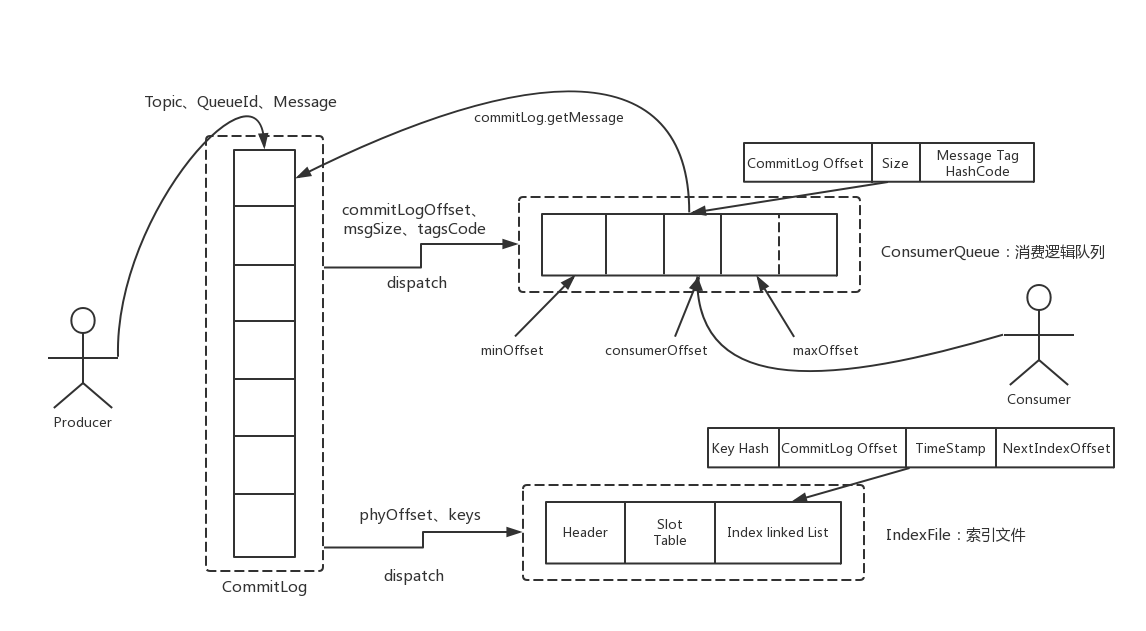
RocketMQ 作为业务消息的首选,除了上文中 ReputMessageService 线程除了构建消费队列的索引外,还同时为每条消息根据 id, key 构建了索引到 IndexFile。这是方便快速快速定位目标消息而产生的,当然这个构建随机索引的能力是可以降级的,IndexFile文件结构如下:
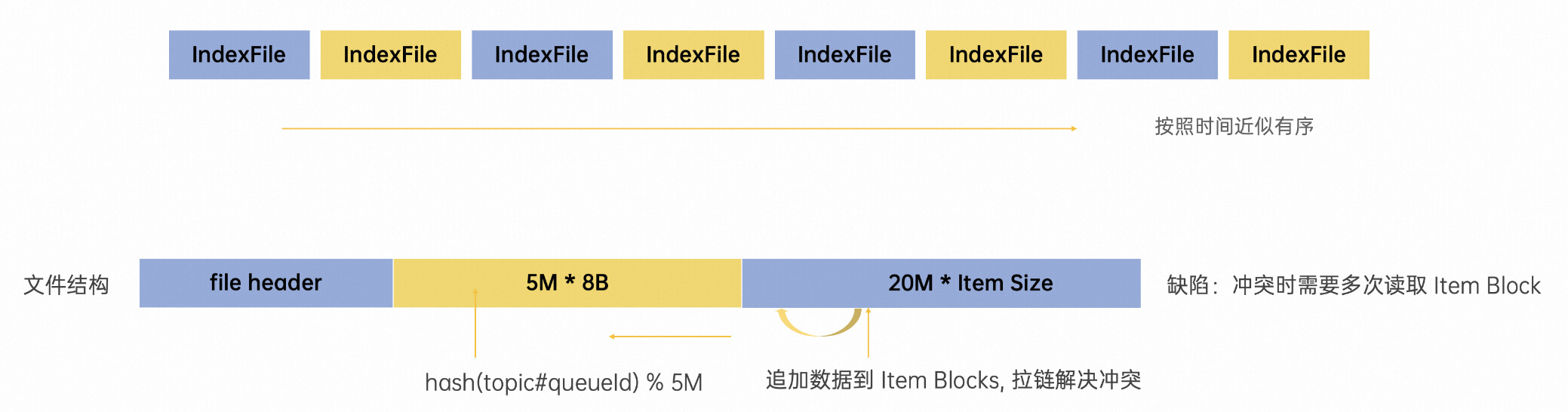
IndexFile 也是定长的,从单个文件的数据结构来说,这是实现了一种简单原生的哈希拉链机制。当一条新的消息索引进来时,首先使用 hash 算法命中黄色部分 500w 个 slot 中的一个,如果存在冲突就使用拉链解决,将最新索引数据的 next 指向上一条索引位置。同时将消息的索引数据 append 至文件尾部(绿色部分),这样便形成了一条当前 slot 按照时间存入的倒序的链表。这里其实也是一种 LSM compaction 在消息模型下的改进,降低了写放大。当用户按照 UniqueKey(MsgId)或者业务 Key 来进行查询时,会先从索引查询消息报存在 CommitLog 中的位置并取回数据返回客户端。
总结
这节的最后我们看看消息实际在目录上是怎么储存的。
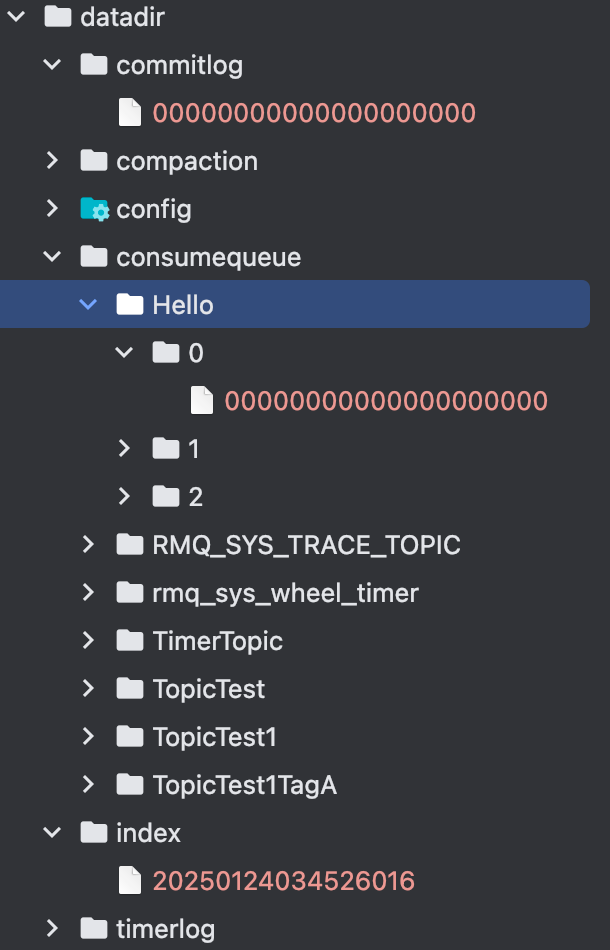
- index目录: index目录就是储存索引文件的目录, 里面的每个文件400M
- commitlog: commitlog目录就是储存具体消息内容的,每个文件的大小1G
- consumequeue: consumequeue目录是用来储存消费队列的信息,每个主题是一个目录,每个主题目录下有多个目录,0/1/2那些是队列目录,里面的文件就是ConsumeQueue, 每个文件的大小5.7M
消息发送
我们从Broker消息发送请求的方法开始梳理Rocketmq消息存储commitLog的存储流程, 首先我们看Broker注册消息发送的处理器。
public void registerProcessor() {
  this.remotingServer.registerProcessor(RequestCode.SEND_MESSAGE, sendMessageProcessor, this.sendMessageExecutor);
  this.remotingServer.registerProcessor(RequestCode.SEND_MESSAGE_V2, sendMessageProcessor, this.sendMessageExecutor);
  this.remotingServer.registerProcessor(RequestCode.SEND_BATCH_MESSAGE, sendMessageProcessor, this.sendMessageExecutor);
  this.remotingServer.registerProcessor(RequestCode.CONSUMER_SEND_MSG_BACK, sendMessageProcessor, this.sendMessageExecutor);
}可以看到所有的消息发送都是由sendMessageProcessor做处理的,我们跟进去看一下
public class SendMessageProcessor extends AbstractSendMessageProcessor implements NettyRequestProcessor {
  @Override
  public RemotingCommand processRequest(ChannelHandlerContext ctx,
    RemotingCommand request) throws RemotingCommandException {
    switch (request.getCode()) {
      case RequestCode.CONSUMER_SEND_MSG_BACK:
        return this.consumerSendMsgBack(ctx, request);
      default:
        SendMessageRequestHeader requestHeader = parseRequestHeader(request);
        sendMessageContext = buildMsgContext(ctx, requestHeader, request);
        // 调用SendMessageHook
        this.executeSendMessageHookBefore(sendMessageContext);
        if (requestHeader.isBatch()) {
          response = this.sendBatchMessage(ctx, request, sendMessageContext, requestHeader, mappingContext,
                  (ctx1, response1) -> executeSendMessageHookAfter(response1, ctx1));
        } else {
          response = this.sendMessage(ctx, request, sendMessageContext, requestHeader, mappingContext,
                  (ctx12, response12) -> executeSendMessageHookAfter(response12, ctx12));
        }
        return response
      }
  }
}可以看到根据批量消息跟普通消息调用了不同的sendMessage方法,我们只看普通消息的发送方法即可。
public RemotingCommand sendMessage(final ChannelHandlerContext ctx, final RemotingCommand request, final SendMessageContext sendMessageContext,final SendMessageRequestHeader requestHeader, final TopicQueueMappingContext mappingContext, final SendMessageCallback sendMessageCallback) throws RemotingCommandException {
  // 检查消息是否可以写入Broker
  final RemotingCommand response = preSend(ctx, request, requestHeader);
  if (response.getCode() != -1) {
    return response;
  }
  if (brokerController.getBrokerConfig().isAsyncSendEnable()) {
    // 发送事务消息,事务消息章节讲解
    if (sendTransactionPrepareMessage) {
      asyncPutMessageFuture = this.brokerController.getTransactionalMessageService().asyncPrepareMessage(msgInner);
    } else {
      // 普通消息
      asyncPutMessageFuture = this.brokerController.getMessageStore().asyncPutMessage(msgInner);
    }
    ...
  } else {
    if (sendTransactionPrepareMessage) {
      putMessageResult = this.brokerController.getTransactionalMessageService().prepareMessage(msgInner);
    } else {
      putMessageResult = this.brokerController.getMessageStore().putMessage(msgInner);
    }
    ...
  }
}brokerController.getBrokerConfig().isAsyncSendEnable()可以看到是根据BrokerConfig的asyncSendEnable这个配置
消息检查
在preSend中会对发送的消息进行一系列的检查,判断该消息是否可以写入Broker,这里大致跟者代码说明一下:
private RemotingCommand preSend(ChannelHandlerContext ctx, RemotingCommand request,
                                SendMessageRequestHeader requestHeader) {
  // 如果Broker还没准备好,报错
  if (this.brokerController.getMessageStore().now() < startTimestamp) {
    response.setCode(ResponseCode.SYSTEM_ERROR);
    response.setRemark(String.format("broker unable to service, until %s", UtilAll.timeMillisToHumanString2(startTimestamp)));
    return response;
  }
  response.setCode(-1);
  super.msgCheck(ctx, requestHeader, request, response);
  return response;
}继续看一下msgCheck方法,代码如下:
protected RemotingCommand msgCheck(final ChannelHandlerContext ctx,
                                    final SendMessageRequestHeader requestHeader, final RemotingCommand request,
                                    final RemotingCommand response) {
  // 如果Broker没有权限写消息,报错
  if (!PermName.isWriteable(this.brokerController.getBrokerConfig().getBrokerPermission())
          && this.brokerController.getTopicConfigManager().isOrderTopic(requestHeader.getTopic())) {
    response.setCode(ResponseCode.NO_PERMISSION);
    return response;
  }
  // 检查Topic的名字是否为空,是否存在非法字符,长度是否满足等
  TopicValidator.ValidateTopicResult result = TopicValidator.validateTopic(requestHeader.getTopic());
  if (!result.isValid()) {
    response.setCode(ResponseCode.SYSTEM_ERROR);
    return response;
  }
  // 检查主题是否在禁止发送的主题里面,比如RMQ_SYS_SCHEDULE_TOPIC/RMQ_SYS_SELF_TEST_TOPIC等等
  if (TopicValidator.isNotAllowedSendTopic(requestHeader.getTopic())) {
    response.setCode(ResponseCode.NO_PERMISSION);
    return response;
  }
  // 从topicConfigTable获取topicConfig
  TopicConfig topicConfig =
          this.brokerController.getTopicConfigManager().selectTopicConfig(requestHeader.getTopic());
  if (null == topicConfig) {
    // 检查是否可以创建该主题,这里会根据Broker的配置autoCreateTopicEnable来判定
    topicConfig = this.brokerController.getTopicConfigManager().createTopicInSendMessageMethod(
            requestHeader.getTopic(),
            requestHeader.getDefaultTopic(),
            RemotingHelper.parseChannelRemoteAddr(ctx.channel()),
            requestHeader.getDefaultTopicQueueNums(), topicSysFlag);

    if (null == topicConfig) {
      // 如果是重试主题,那么会新创建一个主题
      if (requestHeader.getTopic().startsWith(MixAll.RETRY_GROUP_TOPIC_PREFIX)) {
        topicConfig =
                this.brokerController.getTopicConfigManager().createTopicInSendMessageBackMethod(
                        requestHeader.getTopic(), 1, PermName.PERM_WRITE | PermName.PERM_READ,
                        topicSysFlag);
      }
    }

    if (null == topicConfig) {
      response.setCode(ResponseCode.TOPIC_NOT_EXIST);
      return response;
    }
  }
  // 判断queueId是否在Broker的queueId范围里面
  int queueIdInt = requestHeader.getQueueId();
  int idValid = Math.max(topicConfig.getWriteQueueNums(), topicConfig.getReadQueueNums());
  if (queueIdInt >= idValid) {
    response.setCode(ResponseCode.SYSTEM_ERROR);
    return response;
  }
  return response;
}主动创建主题
如果Broker的配置autoCreateTopicEnable打开了,那么Broker就支持创建新主题了。我们看看这个配置都做了什么,在Broker启动的时候,会根据这个属性往NameServer新建一个默认主题。
protected void init() {
  protected void init() {
    TopicConfig defaultTopicConfig = getTopicConfig(defaultTopic);
    if (this.brokerController.getBrokerConfig().isAutoCreateTopicEnable()) {
      String topic = TopicValidator.AUTO_CREATE_TOPIC_KEY_TOPIC;
      TopicConfig topicConfig = new TopicConfig(topic);
      ....
      putTopicConfig(topicConfig);
    }
  }
}然后在上面的BrokerController#getTopicConfigManager#createTopicInSendMessageMethod会判断这个参数。
public TopicConfig createTopicInSendMessageMethod(final String topic, final String defaultTopic,
                                                  final String remoteAddress, final int clientDefaultTopicQueueNums, final int topicSysFlag) {
  ...
  TopicConfig defaultTopicConfig = getTopicConfig(defaultTopic);
  if (defaultTopicConfig != null) {
    if (defaultTopic.equals(TopicValidator.AUTO_CREATE_TOPIC_KEY_TOPIC)) {
      if (!this.brokerController.getBrokerConfig().isAutoCreateTopicEnable()) {
        defaultTopicConfig.setPerm(PermName.PERM_READ | PermName.PERM_WRITE);
      }
    }
    if (PermName.isInherited(defaultTopicConfig.getPerm())) {
      ...
    } else {
      log.warn("Create new topic failed, because the default topic[{}] has no perm [{}] producer:[{}]",
        defaultTopic, defaultTopicConfig.getPerm(), remoteAddress);
    }
  }
}可以看到如果没有配置了autoCreateTopicEnable的话,defaultTopicConfig是空的,而如果配置了autoCreateTopicEnable,那么就会赋予defaultTopicConfig读写权限,否则无法写消息
DefaultMessageStore#asyncPutMessage
好了,让我们回到BrokerController.getMessageStore()的putMessage跟asyncPutMessage这两个发送消息方法
@Override
public PutMessageResult putMessage(MessageExtBrokerInner msg) {
  return waitForPutResult(asyncPutMessage(msg));
}可以看到putMessage调用的也是asyncPutMessage, 所以我们只要看asyncPutMessage这个方法就好了。
@Override
public CompletableFuture<PutMessageResult> asyncPutMessage(MessageExtBrokerInner msg) {
  // 执行所有的PutMessageHook
  for (PutMessageHook putMessageHook : putMessageHookList) {
    PutMessageResult handleResult = putMessageHook.executeBeforePutMessage(msg);
    if (handleResult != null) {
      return CompletableFuture.completedFuture(handleResult);
    }
  }
  ....
  long beginTime = this.getSystemClock().now();
  CompletableFuture<PutMessageResult> putResultFuture = this.commitLog.asyncPutMessage(msg);
  putResultFuture.thenAccept(result -> {
    long elapsedTime = this.getSystemClock().now() - beginTime;
    this.storeStatsService.setPutMessageEntireTimeMax(elapsedTime);
    if (null == result || !result.isOk()) {
      this.storeStatsService.getPutMessageFailedTimes().add(1);
    }
  });
  return putResultFuture;
}PutMessageHook
PutMessageHook是在消息写入commitLog之前对消息进行一些处理,如果对事务消息进行处理,处理延迟消息等等,我们可以看一下这个接口的定义
public interface PutMessageHook {
  /* Name of the hook. */
  String hookName();
  /* Execute before put message. For example, Message verification or special message transform */
  PutMessageResult executeBeforePutMessage(MessageExt msg);
}具体有哪些钩子?在BrokerControlle初始化的时候会调用一个registerMessageStoreHook方法来注册钩子函数,这里列一下:
public void registerMessageStoreHook() {
  // 获取messageStore的putMessage钩子列表
  List<PutMessageHook> putMessageHookList = messageStore.getPutMessageHookList();
  // 检查消息状态
  putMessageHookList.add(new PutMessageHook() {
    public PutMessageResult executeBeforePutMessage(MessageExt msg) {
      return HookUtils.checkBeforePutMessage(BrokerController.this, msg);
    }
  });
  // 处理innerbatch消息
  putMessageHookList.add(new PutMessageHook() {
    public PutMessageResult executeBeforePutMessage(MessageExt msg) {
      if (msg instanceof MessageExtBrokerInner) {
        return HookUtils.checkInnerBatch(BrokerController.this, msg);
      }
      return null;
    }
  });
  // 处理延迟消息
  putMessageHookList.add(new PutMessageHook() {
    @Override
    public PutMessageResult executeBeforePutMessage(MessageExt msg) {
      if (msg instanceof MessageExtBrokerInner) {
        return HookUtils.handleScheduleMessage(BrokerController.this, (MessageExtBrokerInner) msg);
      }
      return null;
    }
  });
}检查消息状态
- 如果broker的消息存储处于关闭状态,直接返回服务不可用
- 如果不允许重复复制,并且broker角色为slave,直接返回服务不可用
- 如果MessageStore不可写,直接返回服务不可用
- 非重试topic且topic超长,则直接返回消息非法
- 如果消息topic大于MAX_TOPIC_LENGTH(255),则直接返回消息非法
- 消息体为空,直接返回消息非法
- PageCache繁忙,直接返回服务不可用
处理innerbatch消息
主要是检查消息的SysFlag跟消息的配置对不对得上,对不上就报错
处理延迟消息
等讲到延迟消息跟定时消息章节再讲解,主要会对消息的内容跟主题做一些转换
CommitLog#asyncPutMessage
在DefaultMessageStore#asyncPutMessage中最终是调用CommitLog#asyncPutMessage发送消息的,我们再来看看这个方法:
public CompletableFuture<PutMessageResult> asyncPutMessage(final MessageExtBrokerInner msg) {
  // 设置消息储存时间
  if (!defaultMessageStore.getMessageStoreConfig().isDuplicationEnable()) {
    msg.setStoreTimestamp(System.currentTimeMillis());
  }
  // 设置消息CRC校验码
  msg.setBodyCRC(UtilAll.crc32(msg.getBody()));
  if (enabledAppendPropCRC) {
    // delete crc32 properties if exist
    msg.deleteProperty(MessageConst.PROPERTY_CRC32);
  }
  // 设置消息版本号
  String topic = msg.getTopic();
  msg.setVersion(MessageVersion.MESSAGE_VERSION_V1);
  boolean autoMessageVersionOnTopicLen =
          this.defaultMessageStore.getMessageStoreConfig().isAutoMessageVersionOnTopicLen();
  if (autoMessageVersionOnTopicLen && topic.length() > Byte.MAX_VALUE) {
    msg.setVersion(MessageVersion.MESSAGE_VERSION_V2);
  }
  // 设置消息产生的host
  InetSocketAddress bornSocketAddress = (InetSocketAddress) msg.getBornHost();
  if (bornSocketAddress.getAddress() instanceof Inet6Address) {
    msg.setBornHostV6Flag();
  }
  // 设置消息储存的host
  InetSocketAddress storeSocketAddress = (InetSocketAddress) msg.getStoreHost();
  if (storeSocketAddress.getAddress() instanceof Inet6Address) {
    msg.setStoreHostAddressV6Flag();
  }
  // 获取要写入的mappedFile文件
  PutMessageThreadLocal putMessageThreadLocal = this.putMessageThreadLocal.get();
  updateMaxMessageSize(putMessageThreadLocal);
  String topicQueueKey = generateKey(putMessageThreadLocal.getKeyBuilder(), msg);
  long elapsedTimeInLock = 0;
  MappedFile unlockMappedFile = null;
  MappedFile mappedFile = this.mappedFileQueue.getLastMappedFile();
  // 获取要写入的mappedFile文件的位置
  long currOffset;
  if (mappedFile == null) {
    currOffset = 0;
  } else {
    currOffset = mappedFile.getFileFromOffset() + mappedFile.getWrotePosition();
  }
  // 主从相关配置
  try {
    long beginLockTimestamp = this.defaultMessageStore.getSystemClock().now();
    this.beginTimeInLock = beginLockTimestamp;
    // 设置保存时间,为了确保全局顺序性
    if (!defaultMessageStore.getMessageStoreConfig().isDuplicationEnable()) {
      msg.setStoreTimestamp(beginLockTimestamp);
    }
    // 如果mappedFile为空或者mappedFile已经满了,重新获取mappedFile
    if (null == mappedFile || mappedFile.isFull()) {
      mappedFile = this.mappedFileQueue.getLastMappedFile(0); // Mark: NewFile may be cause noise
      if (isCloseReadAhead()) {
        setFileReadMode(mappedFile, LibC.MADV_RANDOM);
      }
    }
    // 实际保存方法
    result = mappedFile.appendMessage(msg, this.appendMessageCallback, putMessageContext);
    ...
    // 获取保存结果做处理
  }
  PutMessageResult putMessageResult = new PutMessageResult(PutMessageStatus.PUT_OK, result);

  // Statistics
  storeStatsService.getSinglePutMessageTopicTimesTotal(msg.getTopic()).add(result.getMsgNum());
  storeStatsService.getSinglePutMessageTopicSizeTotal(topic).add(result.getWroteBytes());
  // 同步刷盘等待刷盘结束跟主从处理
  return handleDiskFlushAndHA(putMessageResult, msg, needAckNums, needHandleHA);
}好了,可以看到最终就是调用了MappedFile#appendMessage来保存消息的。
总结
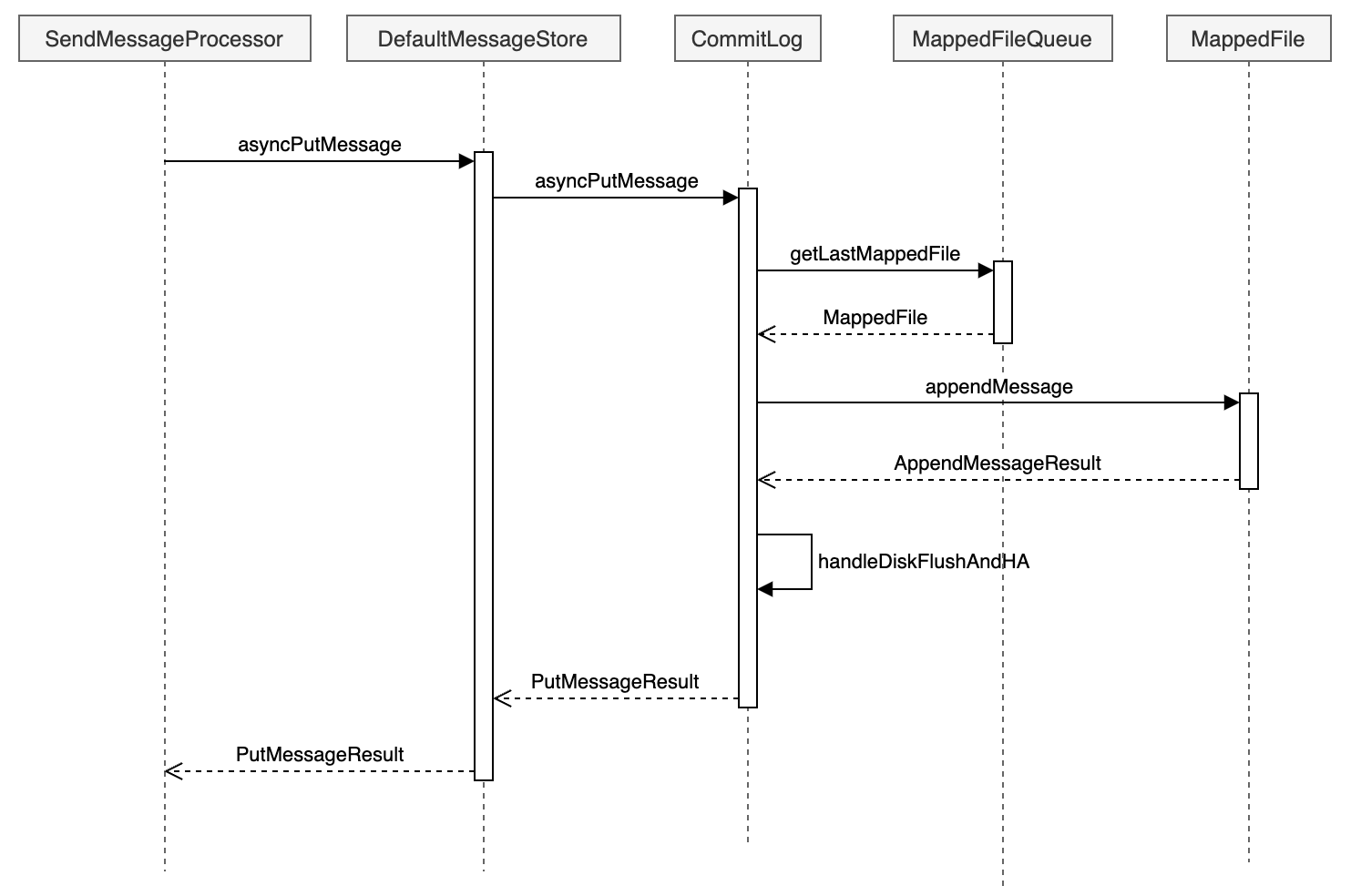
消息存储
- RocketMQ底层使用mmap文件格式来进行消息的存储的, 而负责单个mmap文件的操作逻辑的类就是DefaultMappedFile
- 由于每个mmap文件的大小是有限制的(RocketMQ默认是1G), 当一个mmap文件内容写满了之后,就要新建一个mmap文件来存储新的消息,这样多个mmap之间就组成了一个mmap文件链表,而负责管理这个链表的类就是MappedFileQueue
- 前面两个类只是负责文件的读写,刷新/清除操作等等,对于CommitLog,需要新增加一个类来管理每个mmap文件的格式定义以及读写消息等等,这个类就是CommitLog
- 为了扩展性,可能需要更换默认的存储实现(比如DLedger模式下使用DLedgerCommitLog),所以在CommitLog之上再增加了一层,那就是DefaultMessageStore
DefaultMappedFile
RocketMQ用来实现最底层Mmap文件读写操作的具体实现类是DefaultMappedFile,先看看这个类的属性定义。
// 操作系统每页的大小,默认4K
public static final int OS_PAGE_SIZE = 1024 * 4;
public static final Unsafe UNSAFE = getUnsafe();
// 用来检查MappedFile中某个位置是否已经加载了
private static final Method IS_LOADED_METHOD;
// Unsafe使用的页面大小
public static final int UNSAFE_PAGE_SIZE = UNSAFE == null ? OS_PAGE_SIZE : UNSAFE.pageSize();
// 统计 RocketMQ 使用的所有内存映射文件的虚拟内存总量
protected static final AtomicLong TOTAL_MAPPED_VIRTUAL_MEMORY = new AtomicLong(0);
// RocketMQ 中已映射的文件数量
protected static final AtomicInteger TOTAL_MAPPED_FILES = new AtomicInteger(0);
// 当前写入的文件偏移位置
protected static final AtomicIntegerFieldUpdater<DefaultMappedFile> WROTE_POSITION_UPDATER;
// 已提交的文件偏移位置
protected static final AtomicIntegerFieldUpdater<DefaultMappedFile> COMMITTED_POSITION_UPDATER;
// 已刷盘的文件偏移位置
protected static final AtomicIntegerFieldUpdater<DefaultMappedFile> FLUSHED_POSITION_UPDATER;
// 当前文件中写入的位置
protected volatile int wrotePosition;
// 消息已经提交(即成功写入到文件并被确认)的偏移位置
protected volatile int committedPosition;
// 已刷盘(即成功持久化到磁盘)的偏移位置
protected volatile int flushedPosition;
// 当前文件的大小
protected int fileSize;
// 用于操作文件的通道,允许对文件进行读写操作
protected FileChannel fileChannel;
/* 如果使用了transientStorePool,那么先会将写入的数据放到writeBuffer,然后再刷新到transientStorePool */
protected ByteBuffer writeBuffer = null;
// 存暂时存储的数据。当内存足够时,可以将消息先存储到内存池中,待合适时机再写入磁盘,减少磁盘的 I/O 操作
protected TransientStorePool transientStorePool = null;
// 当前映射文件的文件名
protected String fileName;
// 文件中存储的消息的起始偏移量。即这个文件从哪个消息位置开始存储
protected long fileFromOffset;
// 当前映射文件对应的 File 对象,用于进行文件操作(例如打开、关闭文件)
protected File file;
// 通过内存映射技术映射到内存的字节缓冲区,用于高效地存取文件中的数据
protected MappedByteBuffer mappedByteBuffer;
// 当前文件的创建时间或最后修改时间,通常用于日志或文件管理
protected volatile long storeTimestamp = 0;
// 标识当前映射文件是否是队列中的第一个文件
protected boolean firstCreateInQueue = false;
// 记录上次刷新操作的时间。用于控制消息刷盘的频率,避免频繁的磁盘I/O操作
private long lastFlushTime = -1L;
// 某些情况下,映射文件可能需要被清理或重新映射,这个字段存储待清理的内存映射缓冲区
protected MappedByteBuffer mappedByteBufferWaitToClean = null;
// 最近一次内存映射的时间。它可能用于控制内存映射的频率,以优化性能
protected long swapMapTime = 0L;
// 记录自上次映射交换以来,mappedByteBuffer 被访问的次数。可以帮助决定何时重新映射文件或交换内存区域,以提高性能
protected long mappedByteBufferAccessCountSinceLastSwap = 0L;
/* 如果当前映射文件属于消费队列,记录该文件存储的第一个消息的时间戳 */
private long startTimestamp = -1;
/* 如果当前映射文件属于消费队列,记录该文件存储的最后一个消息的时间戳 */
private long stopTimestamp = -1;DefaultMappedFile初始化就是在DefaultMappedFile的构造函数中执行的,代码如下:
public DefaultMappedFile(final String fileName, final int fileSize) throws IOException {
    init(fileName, fileSize);
}

public void init(final String fileName, final int fileSize,
    final TransientStorePool transientStorePool) throws IOException {
    init(fileName, fileSize);
    this.writeBuffer = transientStorePool.borrowBuffer();
    this.transientStorePool = transientStorePool;
}

private void init(final String fileName, final int fileSize) throws IOException {
  this.fileName = fileName;
  this.fileSize = fileSize;
  this.file = new File(fileName);
  this.fileFromOffset = Long.parseLong(this.file.getName());
  UtilAll.ensureDirOK(this.file.getParent());
  // 打开对应的文件,获取到fileChannel
  this.fileChannel = new RandomAccessFile(this.file, "rw").getChannel();
  // 通过fileChannel获取到mmap内存映射buffer
  this.mappedByteBuffer = this.fileChannel.map(MapMode.READ_WRITE, 0, fileSize);
  TOTAL_MAPPED_VIRTUAL_MEMORY.addAndGet(fileSize);
  TOTAL_MAPPED_FILES.incrementAndGet();
}可以看到就是创建了一个mmap文件并且映射了Mmap操作; 我们看看是DefaultMappedFile是在哪里创建出来的。
protected MappedFile doCreateMappedFile(String nextFilePath, String nextNextFilePath) {
  MappedFile mappedFile = null;
  if (this.allocateMappedFileService != null) {
    mappedFile = this.allocateMappedFileService.putRequestAndReturnMappedFile(nextFilePath,
            nextNextFilePath, this.mappedFileSize);
  } else {
    mappedFile = new DefaultMappedFile(nextFilePath, this.mappedFileSize);
  }
  if (mappedFile != null) {
    if (this.mappedFiles.isEmpty()) {
      mappedFile.setFirstCreateInQueue(true);
    }
    this.mappedFiles.add(mappedFile);
  }
  return mappedFile;
}可以看到如果存在AllocateMappedFileService,就调用allocateMappedFileService.putRequestAndReturnMappedFile来创建mappedFile,否则直接new一个mappedFile。
AllocateMappedFileService的逻辑就不细说了,看AllocateMappedFileService#putRequestAndReturnMappedFile->requestTable#putIfAbsent和AllocateMappedFileService#run -> AllocateMappedFileService#mmapOperation里面关于MappedFile的new方法
MappedFileQueue
当MappedFile文件有多个的时候,就要使用MappedFileQueue来管理MappedFile了,我们看一下这个类的属性。
// 消息存储的根目录路径
protected final String storePath;
// 单个文件的存储大小
protected final int mappedFileSize;
// MappedFile文件集合
protected final CopyOnWriteArrayList<MappedFile> mappedFiles = new CopyOnWriteArrayList<>();
// 创建MappedFile服务类
protected final AllocateMappedFileService allocateMappedFileService;
// 当前刷盘指针
protected long flushedWhere = 0;
// 当前数据提交指针
protected long committedWhere = 0;
// 当前存储文件的创建时间或最后更新时间
protected volatile long storeTimestamp = 0;再看一下这个类是在哪里初始化的。
public CommitLog(final DefaultMessageStore messageStore) {
  String storePath = messageStore.getMessageStoreConfig().getStorePathCommitLog();
  if (storePath.contains(MixAll.MULTI_PATH_SPLITTER)) {
    this.mappedFileQueue = new MultiPathMappedFileQueue(messageStore.getMessageStoreConfig(),
            messageStore.getMessageStoreConfig().getMappedFileSizeCommitLog(),
            messageStore.getAllocateMappedFileService(), this::getFullStorePaths);
  } else {
    this.mappedFileQueue = new MappedFileQueue(storePath,
            messageStore.getMessageStoreConfig().getMappedFileSizeCommitLog(),
            messageStore.getAllocateMappedFileService());
  }
}可以看到storePath跟mappedFileSize这两个参数都是可以进行配置的。
CommitLog
CommitLog就是用来定义消息储存格式以及消息保存的类,我们看一下这个类的属性都有什么。
// Message's MAGIC CODE daa320a7
public final static int MESSAGE_MAGIC_CODE = -626843481;
// End of file empty MAGIC CODE cbd43194
public final static int BLANK_MAGIC_CODE = -875286124;
// 用来计算 CRC32 校验值的存储所需的字节数,确保消息的一致性和完整性
// CRC32 Format: [PROPERTY_CRC32 + NAME_VALUE_SEPARATOR + 10-digit fixed-length string + PROPERTY_SEPARATOR]
public static final int CRC32_RESERVED_LEN = MessageConst.PROPERTY_CRC32.length() + 1 + 10 + 1;
// 处理消息存储的队列。它利用内存映射文件 (Memory-Mapped Files) 来优化文件的读写性能,支持快速的文件操作
protected final MappedFileQueue mappedFileQueue;
// DefaultMessageStore
protected final DefaultMessageStore defaultMessageStore;
// 默认的消息存储实现类。它负责消息的持久化和加载,并提供存储相关的接口,保证消息的可靠存储和检索
private final FlushManager flushManager;
// 负责检查“冷数据”, 监控存储中的数据是否符合“热/冷”数据的分类,可能会影响存储的管理和清理策略
private final ColdDataCheckService coldDataCheckService;
// 回调函数,用于处理消息的追加操作。在消息写入磁盘时,RocketMQ 会通过回调函数来控制如何将消息追加到文件中,确保数据一致性和高效写入
private final AppendMessageCallback appendMessageCallback;
// 线程局部变量,用于存储与当前线程相关的消息存储信息
private final ThreadLocal<PutMessageThreadLocal> putMessageThreadLocal;
// 确认偏移量是指消费者已经成功消费的消息的位移。在消息消费过程中,确认偏移量是用来确保消息被成功消费且不会重复消费的关键。
protected volatile long confirmOffset = -1L;
// 记录进入锁定状态的开始时间,它用于跟踪获取锁时的时间戳,可能用于分析锁的持有时间,以帮助进行性能调优和锁管理。
private volatile long beginTimeInLock = 0;
// 用于消息存储操作时的锁对象
protected final PutMessageLock putMessageLock;
// 消息是按主题(Topic)和队列(Queue)组织的,因此为了避免多个生产者或消费者并发访问同一个队列而产生冲突,TopicQueueLock 用来控制队列级别的锁,确保操作的顺序和一致性
protected final TopicQueueLock topicQueueLock;
// 保存了已经满载的存储路径。消息存储通常会分配多个存储路径(如文件目录),当某个路径的磁盘空间已满时,它会被标记为“满载”。这个集合帮助 RocketMQ 了解哪些存储路径已被占用,避免进一步写入
private volatile Set<String> fullStorePaths = Collections.emptySet();
// 监控磁盘刷写操作的工具,它帮助监控磁盘是否达到预期的写入性能或者是否出现异常
private final FlushDiskWatcher flushDiskWatcher;
// 消息提交日志(CommitLog)的大小,通常与文件分配和存储容量相关
protected int commitLogSize;
// 启用消息的 CRC 校验属性, 如果这个属性为 true,那么每条消息都会附带一个 CRC 校验值
private final boolean enabledAppendPropCRC;
// 多路分发机制,用于在多个消息消费者之间分发消息。它能够处理消息的负载均衡和分发逻辑,确保消息能够高效地分配到各个消费者上
protected final MultiDispatch multiDispatch;CommitLog的初始化是在DefaultMessageStore中做处理的,具体代码如下:
public DefaultMessageStore(final MessageStoreConfig messageStoreConfig, final BrokerStatsManager brokerStatsManager,
                            final MessageArrivingListener messageArrivingListener, final BrokerConfig brokerConfig, final ConcurrentMap<String, TopicConfig> topicConfigTable) throws IOException {
  if (messageStoreConfig.isEnableDLegerCommitLog()) {
    this.commitLog = new DLedgerCommitLog(this);
  } else {
    this.commitLog = new CommitLog(this);
  }
}DefaultMessageStore
这个类就是具体最终实现消息存储的类,包含了很多对存储文件操作的API,其他模块对消息实体的操作都是通过这个类来进行操作的。
我们看看这个类的一些属性,具体如下所示:
// 包含消息存储的相关参数,比如存储路径、CommitLog 文件大小、刷盘策略、消息存储的最大大小等
private final MessageStoreConfig messageStoreConfig;
// RocketMQ 的核心存储文件,所有消息都会首先写入 CommitLog 文件。commitLog 存储消息的持久化记录,是消息存储的主要组件
protected final CommitLog commitLog;
// 消费队列
protected final ConsumeQueueStoreInterface consumeQueueStore;
// 消费队列的刷盘服务,负责周期性地将消费队列数据刷写到磁盘,确保消费进度持久化
private final FlushConsumeQueueService flushConsumeQueueService;
// 清除commitlog文件服务
protected final CleanCommitLogService cleanCommitLogService;
// 定期清理已不再使用的CommitLog文件,RocketMQ 会在消息消费并持久化后,定期清理旧的 CommitLog 文件,释放磁盘空间。
private final CleanConsumeQueueService cleanConsumeQueueService;
// 用于修正消息的逻辑偏移量(例如,逻辑错误导致的偏移量不一致),确保消息消费的准确性和一致性
private final CorrectLogicOffsetService correctLogicOffsetService;
// 维护消息索引,RocketMQ 为提高消息查询效率,会生成索引文件
protected final IndexService indexService;
// 负责分配新的MappedFile文件,此服务确保新的文件在需要时得到分配,并且管理文件的生命周期
private final AllocateMappedFileService allocateMappedFileService;
// CommitLog消息分发,根据CommitLog文件构建ConsumeQueue,IndexFile文件
private ReputMessageService reputMessageService;
// 存储HA机制
private HAService haService;
// 压缩存储的组件。为了节省存储空间和提高性能,RocketMQ 会定期执行日志压缩操作,将旧的、无效的数据合并成更小的存储文件
private CompactionStore compactionStore;
// 启动和执行日志压缩操作。通过定期合并和删除无效数据,它优化了存储空间的使用和文件系统的性能
private CompactionService compactionService;
// 消息存储相关的统计信息,帮助监控和分析存储系统的运行状态和性能
private final StoreStatsService storeStatsService;
// 临时存储池,用于缓存消息数据。当内存足够时,消息数据会先存储在临时池中,然后再写入磁盘
private final TransientStorePool transientStorePool;
// 存储 RocketMQ 当前运行状态的标志,例如是否处于运行中、是否在执行任务等
protected final RunningFlags runningFlags = new RunningFlags();
// 获取系统的当前时间
private final SystemClock systemClock = new SystemClock();
// 调度线程池,用于定时执行任务。RocketMQ 使用它来定时执行一些任务,比如文件刷盘、清理过期文件、心跳检测等
private final ScheduledExecutorService scheduledExecutorService;
// Broker状态管理,如吞吐量、消息量等,帮助监控和分析 broker 的性能
private final BrokerStatsManager brokerStatsManager;
// 消息拉取长轮询模式到达监听器
private final MessageArrivingListener messageArrivingListener;
// 包含了 broker 的网络、存储、消息处理等各项参数。
private final BrokerConfig brokerConfig;
private volatile boolean shutdown = true;
// 批量消息到达通知
protected boolean notifyMessageArriveInBatch = false;
// 文件刷盘监测点
protected StoreCheckpoint storeCheckpoint;
// 存储定时消息。RocketMQ 支持定时消息功能,timerMessageStore 负责存储这些延迟投递的消息
private TimerMessageStore timerMessageStore;
// CommitLog文件转发
private final LinkedList<CommitLogDispatcher> dispatcherList;
// RocksDB存储
private RocksDBMessageStore rocksDBMessageStore;
private RandomAccessFile lockFile;
private FileLock lock;
boolean shutDownNormal = false;
// 最大拉取消息大小,用于控制消息消费时每次拉取的最大数据量
private final static int MAX_PULL_MSG_SIZE = 128 * 1024 * 1024;
// 可用的副本数量
private volatile int aliveReplicasNum = 1;
// Refer the MessageStore of MasterBroker in the same process.
// If current broker is master, this reference point to null or itself.
// If current broker is slave, this reference point to the store of master broker, and the two stores belong to
// different broker groups.
private MessageStore masterStoreInProcess = null;
private volatile long masterFlushedOffset = -1L;
private volatile long brokerInitMaxOffset = -1L;
// 存储 PutMessage 钩子列表,RocketMQ 支持在消息存储前后执行钩子操作
private List<PutMessageHook> putMessageHookList = new ArrayList<>();
// 发送消息回调的钩子,允许在消息发送后执行回调操作
private SendMessageBackHook sendMessageBackHook;
// 存储延迟消息的延迟级别和对应的延迟时间
private final ConcurrentSkipListMap<Integer /* level */, Long/* delay timeMillis */> delayLevelTable =
        new ConcurrentSkipListMap<>();
// 最大的延迟级别
private int maxDelayLevel;
// 统计当前持有的映射页面数
private final AtomicInteger mappedPageHoldCount = new AtomicInteger(0);
// 存储批量调度请求,处理多个请求的批量调度
private final ConcurrentLinkedQueue<BatchDispatchRequest> batchDispatchRequestQueue = new ConcurrentLinkedQueue<>();
// 顺序调度队列的大小
private int dispatchRequestOrderlyQueueSize = 16;
// 顺序调度队列
private final DispatchRequestOrderlyQueue dispatchRequestOrderlyQueue = new DispatchRequestOrderlyQueue(dispatchRequestOrderlyQueueSize);
// 状态机版本号
private long stateMachineVersion = 0L;
// 主题配置表
private ConcurrentMap<String, TopicConfig> topicConfigTable;
// 用于定期清理消费队列。它在后台定时执行任务,清理过期或无效的消费队列文件
private final ScheduledExecutorService scheduledCleanQueueExecutorService =
ThreadUtils.newSingleThreadScheduledExecutor(new ThreadFactoryImpl("StoreCleanQueueScheduledThread"));我们看看DefaultMessageStore是在哪里初始化的吧,具体代码如下所示:
public boolean initializeMessageStore() {
  DefaultMessageStore defaultMessageStore;
  if (this.messageStoreConfig.isEnableRocksDBStore()) {
    defaultMessageStore = new RocksDBMessageStore(this.messageStoreConfig, this.brokerStatsManager, this.messageArrivingListener, this.brokerConfig, topicConfigManager.getTopicConfigTable());
  } else {
    defaultMessageStore = new DefaultMessageStore(this.messageStoreConfig, this.brokerStatsManager, this.messageArrivingListener, this.brokerConfig, topicConfigManager.getTopicConfigTable());
    if (messageStoreConfig.isRocksdbCQDoubleWriteEnable()) {
      defaultMessageStore.enableRocksdbCQWrite();
    }
  }
}消息写入缓存
由于DefaultMessageStore#asyncPutMessage在存储消息就只有三步
- 调用putMessageHook钩子列表
- 调用commitLog#asyncPutMessage方法存储消息
- 存储消息完毕之后调用storeStatsService记录消息存储相关的统计信息
commitLog#asyncPutMessage
我们直接从commitLog#asyncPutMessage开始看起,忽略具体代码细节,只讲流程实现。
public CompletableFuture<PutMessageResult> asyncPutMessage(final MessageExtBrokerInner msg) {
  ...
  // 从MappedFileQueue获取最新的MappedFile
  MappedFile mappedFile = this.mappedFileQueue.getLastMappedFile();
  long currOffset;
  // 如果mappedFile为空,说明现在是初始化状态
  if (mappedFile == null) {
    currOffset = 0;
  } else {
    // 记录当前的消息写位置
    currOffset = mappedFile.getFileFromOffset() + mappedFile.getWrotePosition();
  }
  // 如果mappedFile为空,那么创建一个mappedFile
  if (null == mappedFile || mappedFile.isFull()) {
    mappedFile = this.mappedFileQueue.getLastMappedFile(0); // Mark: NewFile may be cause noise
  }
  // 存储消息
  result = mappedFile.appendMessage(msg, this.appendMessageCallback, putMessageContext);
  switch (result.getStatus()) {
    case PUT_OK:
      // 存储消息成功
      onCommitLogAppend(msg, result, mappedFile);
      break;
    case END_OF_FILE:
      // MappedFile文件已经满了,重新创建一个MappedFile
      onCommitLogAppend(msg, result, mappedFile);
      unlockMappedFile = mappedFile;
      // Create a new file, re-write the message
      mappedFile = this.mappedFileQueue.getLastMappedFile(0);
      // 重新保存
      result = mappedFile.appendMessage(msg, this.appendMessageCallback, putMessageContext);
      if (AppendMessageStatus.PUT_OK.equals(result.getStatus())) {
        onCommitLogAppend(msg, result, mappedFile);
      }
      break;
  }
  PutMessageResult putMessageResult = new PutMessageResult(PutMessageStatus.PUT_OK, result);
  // 同步发送等待刷盘结束,主从设备需要复制到从机
  return handleDiskFlushAndHA(putMessageResult, msg, needAckNums, needHandleHA);
}MappedFile#appendMessag
MappedFile#appendMessag -> DefaultMappedFile#appendMessag -> DefaultMappedFile#appendMessagesInner, 我们看看这个方法
public AppendMessageResult appendMessagesInner(final MessageExt messageExt, final AppendMessageCallback cb,
    PutMessageContext putMessageContext) {
  // 获取当前写位置
  int currentPos = WROTE_POSITION_UPDATER.get(this);
  if (currentPos < this.fileSize) {
    // 获取读写buffer
    ByteBuffer byteBuffer = appendMessageBuffer().slice();
    byteBuffer.position(currentPos);
    AppendMessageResult result;
    if (messageExt instanceof MessageExtBatch && !((MessageExtBatch) messageExt).isInnerBatch()) {
       // traditional batch message
      result = cb.doAppend(this.getFileFromOffset(), byteBuffer, this.fileSize - currentPos,
            (MessageExtBatch) messageExt, putMessageContext);
    } else if (messageExt instanceof MessageExtBrokerInner) {
      // traditional single message or newly introduced inner-batch message
      // 将消息追加到byteBuffer后面
      result = cb.doAppend(this.getFileFromOffset(), byteBuffer, this.fileSize - currentPos,
          (MessageExtBrokerInner) messageExt, putMessageContext);
    } else {
      return new AppendMessageResult(AppendMessageStatus.UNKNOWN_ERROR);
    }
    WROTE_POSITION_UPDATER.addAndGet(this, result.getWroteBytes());
    this.storeTimestamp = result.getStoreTimestamp();
    return result;
  }
  log.error("MappedFile.appendMessage return null, wrotePosition: {} fileSize: {}", currentPos, this.fileSize);
  return new AppendMessageResult(AppendMessageStatus.UNKNOWN_ERROR);
}这里有个核心的方法就是第7行byteBuffer,我们看看里面的实现
protected ByteBuffer appendMessageBuffer() {
  this.mappedByteBufferAccessCountSinceLastSwap++;
  return writeBuffer != null ? writeBuffer : this.mappedByteBuffer;
}可以看到如果writeBuffer不为空,就会返回writeBuffer,否则才会返回mappedByteBuffer(即Mmap), 可以看到RocketMQ不全是使用MMAP来存储消息的。
@Override
public void init(final String fileName, final int fileSize,
                  final TransientStorePool transientStorePool) throws IOException {
  init(fileName, fileSize);
  this.writeBuffer = transientStorePool.borrowBuffer();
  this.transientStorePool = transientStorePool;
}如果开启了transientStorePool, 在broker.conf中定义了transientStorePoolEnable这个参数,那么就会开启内存池,使用内存池来缓存消息。至于为什么要这么做,可以看一下这个图。
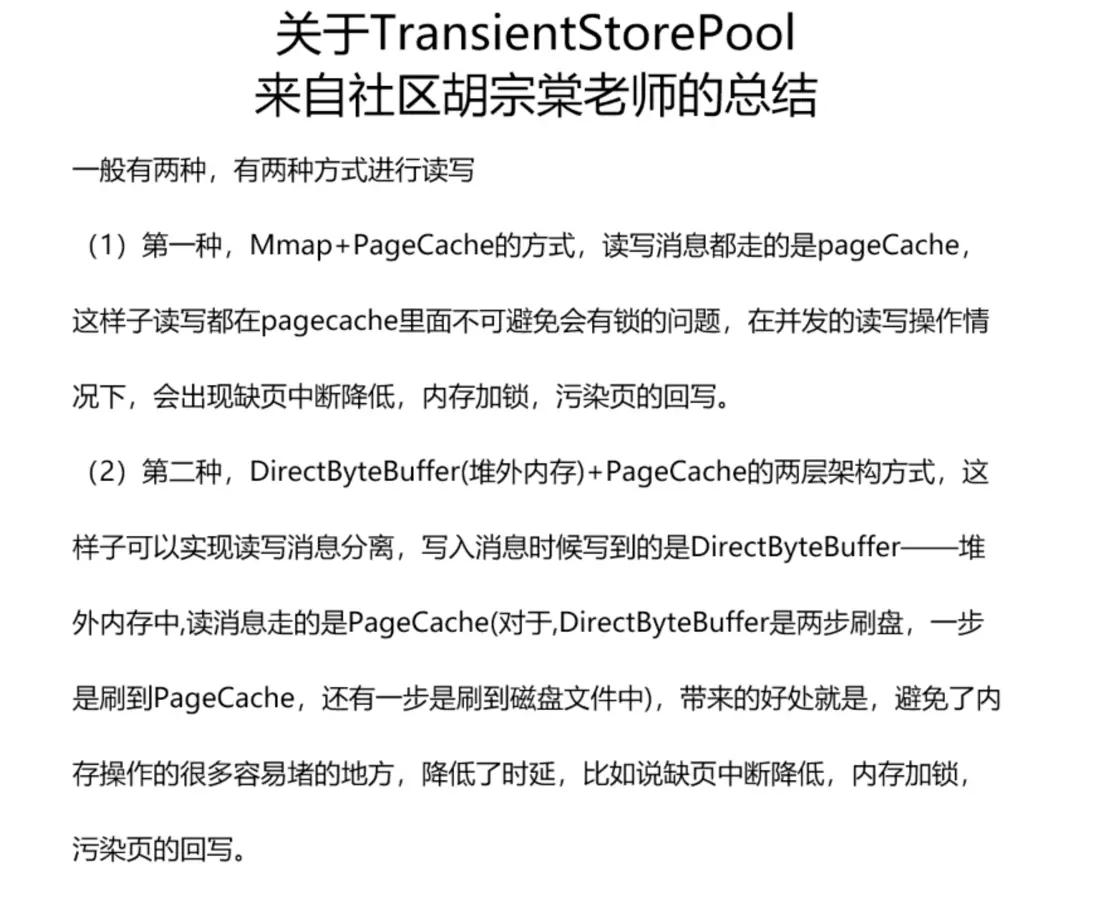
我们再看看transientStorePool初始化的地方,看看有什么配置
public DefaultMessageStore(final MessageStoreConfig messageStoreConfig, final BrokerStatsManager brokerStatsManager,
                            final MessageArrivingListener messageArrivingListener, final BrokerConfig brokerConfig, final ConcurrentMap<String, TopicConfig> topicConfigTable) throws IOException {
  this.transientStorePool = new TransientStorePool(messageStoreConfig.getTransientStorePoolSize(), messageStoreConfig.getMappedFileSizeCommitLog());
}可以看到有两个配置参数,可以broker.conf配置,如下所示
- transientStorePoolSize: transientStorePool的个数,默认是5个
- mappedFileSizeCommitLog: 每个transientStorePool的大小,默认是1G,即CommitlLog的大小
再看看transientStorePoolSize的初始化函数,如下所示
public TransientStorePool(final int poolSize, final int fileSize) {
    this.poolSize = poolSize;
    this.fileSize = fileSize;
    this.availableBuffers = new ConcurrentLinkedDeque<>();
}

public void init() {
  for (int i = 0; i < poolSize; i++) {
    ByteBuffer byteBuffer = ByteBuffer.allocateDirect(fileSize);
    final long address = ((DirectBuffer) byteBuffer).address();
    Pointer pointer = new Pointer(address);
    LibC.INSTANCE.mlock(pointer, new NativeLong(fileSize));
    availableBuffers.offer(byteBuffer);
  }
}WARNING
如果使用了TransientStorePool,可以看到会额外占用 transientStorePoolSize * mappedFileSizeCommitLog大小的堆外内存,注意要预留内存空间
CommitLog#doAppend
接下来看具体的消息写入方法CommitLog#doAppend,代码如下所示:
public AppendMessageResult doAppend(final long fileFromOffset, final ByteBuffer byteBuffer, final int maxBlank,
                                    final MessageExtBrokerInner msgInner, PutMessageContext putMessageContext) {
  // STORETIMESTAMP + STOREHOSTADDRESS + OFFSET <br>

  ByteBuffer preEncodeBuffer = msgInner.getEncodedBuff();
  final boolean isMultiDispatchMsg = CommitLog.isMultiDispatchMsg(messageStoreConfig, msgInner);
  if (isMultiDispatchMsg) {
    AppendMessageResult appendMessageResult = handlePropertiesForLmqMsg(preEncodeBuffer, msgInner);
    if (appendMessageResult != null) {
      return appendMessageResult;
    }
  }

  final int msgLen = preEncodeBuffer.getInt(0);
  preEncodeBuffer.position(0);
  preEncodeBuffer.limit(msgLen);

  // PHY OFFSET
  long wroteOffset = fileFromOffset + byteBuffer.position();

  Supplier<String> msgIdSupplier = () -> {
    int sysflag = msgInner.getSysFlag();
    int msgIdLen = (sysflag & MessageSysFlag.STOREHOSTADDRESS_V6_FLAG) == 0 ? 4 + 4 + 8 : 16 + 4 + 8;
    ByteBuffer msgIdBuffer = ByteBuffer.allocate(msgIdLen);
    MessageExt.socketAddress2ByteBuffer(msgInner.getStoreHost(), msgIdBuffer);
    msgIdBuffer.clear();//because socketAddress2ByteBuffer flip the buffer
    msgIdBuffer.putLong(msgIdLen - 8, wroteOffset);
    return UtilAll.bytes2string(msgIdBuffer.array());
  };

  // Record ConsumeQueue information
  Long queueOffset = msgInner.getQueueOffset();

  // this msg maybe an inner-batch msg.
  short messageNum = getMessageNum(msgInner);

  // Transaction messages that require special handling
  final int tranType = MessageSysFlag.getTransactionValue(msgInner.getSysFlag());
  switch (tranType) {
    // Prepared and Rollback message is not consumed, will not enter the consume queue
    case MessageSysFlag.TRANSACTION_PREPARED_TYPE:
    case MessageSysFlag.TRANSACTION_ROLLBACK_TYPE:
      queueOffset = 0L;
      break;
    case MessageSysFlag.TRANSACTION_NOT_TYPE:
    case MessageSysFlag.TRANSACTION_COMMIT_TYPE:
    default:
      break;
  }

  // Determines whether there is sufficient free space
  if ((msgLen + END_FILE_MIN_BLANK_LENGTH) > maxBlank) {
    this.msgStoreItemMemory.clear();
    // 1 TOTALSIZE
    this.msgStoreItemMemory.putInt(maxBlank);
    // 2 MAGICCODE
    this.msgStoreItemMemory.putInt(CommitLog.BLANK_MAGIC_CODE);
    // 3 The remaining space may be any value
    // Here the length of the specially set maxBlank
    final long beginTimeMills = CommitLog.this.defaultMessageStore.now();
    byteBuffer.put(this.msgStoreItemMemory.array(), 0, 8);
    return new AppendMessageResult(AppendMessageStatus.END_OF_FILE, wroteOffset,
            maxBlank, /* only wrote 8 bytes, but declare wrote maxBlank for compute write position */
            msgIdSupplier, msgInner.getStoreTimestamp(),
            queueOffset, CommitLog.this.defaultMessageStore.now() - beginTimeMills);
  }

  int pos = 4     // 1 TOTALSIZE
          + 4     // 2 MAGICCODE
          + 4     // 3 BODYCRC
          + 4     // 4 QUEUEID
          + 4;    // 5 FLAG
  // 6 QUEUEOFFSET
  preEncodeBuffer.putLong(pos, queueOffset);
  pos += 8;
  // 7 PHYSICALOFFSET
  preEncodeBuffer.putLong(pos, fileFromOffset + byteBuffer.position());
  pos += 8;
  int ipLen = (msgInner.getSysFlag() & MessageSysFlag.BORNHOST_V6_FLAG) == 0 ? 4 + 4 : 16 + 4;
  // 8 SYSFLAG, 9 BORNTIMESTAMP, 10 BORNHOST
  pos += 4 + 8 + ipLen;
  // 11 STORETIMESTAMP refresh store time stamp in lock
  preEncodeBuffer.putLong(pos, msgInner.getStoreTimestamp());
  if (enabledAppendPropCRC) {
    // 18 CRC32
    int checkSize = msgLen - crc32ReservedLength;
    ByteBuffer tmpBuffer = preEncodeBuffer.duplicate();
    tmpBuffer.limit(tmpBuffer.position() + checkSize);
    int crc32 = UtilAll.crc32(tmpBuffer);   // UtilAll.crc32 function will change the position to limit of the buffer
    tmpBuffer.limit(tmpBuffer.position() + crc32ReservedLength);
    MessageDecoder.createCrc32(tmpBuffer, crc32);
  }

  final long beginTimeMills = CommitLog.this.defaultMessageStore.now();
  CommitLog.this.getMessageStore().getPerfCounter().startTick("WRITE_MEMORY_TIME_MS");
  // Write messages to the queue buffer
  byteBuffer.put(preEncodeBuffer);
  CommitLog.this.getMessageStore().getPerfCounter().endTick("WRITE_MEMORY_TIME_MS");
  msgInner.setEncodedBuff(null);

  if (isMultiDispatchMsg) {
    CommitLog.this.multiDispatch.updateMultiQueueOffset(msgInner);
  }

  return new AppendMessageResult(AppendMessageStatus.PUT_OK, wroteOffset, msgLen, msgIdSupplier,
          msgInner.getStoreTimestamp(), queueOffset, CommitLog.this.defaultMessageStore.now() - beginTimeMills, messageNum);
}可以看到就是封装了一个preEncodeBuffer,然后将preEncodeBuffer放入到byteBuffer里面,最后返回结果,很简单。具体的preEncodeBuffer封装不是重点,就不细讲了。
消息刷盘
前面消息写入缓存的时候最终只是调用了byteBuffer#put把消息写入到缓冲区里面就返回了,具体的消息是在什么时候写入到磁盘里面的。
DefaultFlushManager
这个是由CommitLog的一个服务 -> flushManager进行处理的,我们看看flushManager这个类
class DefaultFlushManager implements FlushManager {

  private final FlushCommitLogService flushCommitLogService;

  //If TransientStorePool enabled, we must flush message to FileChannel at fixed periods
  private final FlushCommitLogService commitRealTimeService;

  public DefaultFlushManager() {
    if (FlushDiskType.SYNC_FLUSH == CommitLog.this.defaultMessageStore.getMessageStoreConfig().getFlushDiskType()) {
      this.flushCommitLogService = new CommitLog.GroupCommitService();
    } else {
      this.flushCommitLogService = new CommitLog.FlushRealTimeService();
    }

    this.commitRealTimeService = new CommitLog.CommitRealTimeService();
  }
}可以看到定义了两个CommitLogService,它们具体的作用如下所示:
- flushCommitLogService: CommitLog刷盘服务,如果是broker.conf中定义的flushDiskType是SYNC_FLUSH,就使用GroupCommitService,否则使用FlushRealTimeService
- commitRealTimeService: 针对TransientStorePool模式,需要新增一个服务,将writebuffer的数据写入到fileChannel里面
GroupCommitService
class GroupCommitService extends FlushCommitLogService {
  private volatile LinkedList<GroupCommitRequest> requestsWrite = new LinkedList<>();
  private volatile LinkedList<GroupCommitRequest> requestsRead = new LinkedList<>();

  private void doCommit() {
    if (!this.requestsRead.isEmpty()) {
      for (GroupCommitRequest req : this.requestsRead) {
        boolean flushOK = CommitLog.this.mappedFileQueue.getFlushedWhere() >= req.getNextOffset();
        for (int i = 0; i < 1000 && !flushOK; i++) {
          CommitLog.this.mappedFileQueue.flush(0);
          flushOK = CommitLog.this.mappedFileQueue.getFlushedWhere() >= req.getNextOffset();
          if (flushOK) {
            break;
          } else {
            // When transientStorePoolEnable is true, the messages in writeBuffer may not be committed
            // to pageCache very quickly, and flushOk here may almost be false, so we can sleep 1ms to
            // wait for the messages to be committed to pageCache.
            try {
              Thread.sleep(1);
            } catch (InterruptedException ignored) {
            }
          }
        }

        req.wakeupCustomer(flushOK ? PutMessageStatus.PUT_OK : PutMessageStatus.FLUSH_DISK_TIMEOUT);
      }

      long storeTimestamp = CommitLog.this.mappedFileQueue.getStoreTimestamp();
      if (storeTimestamp > 0) {
        CommitLog.this.defaultMessageStore.getStoreCheckpoint().setPhysicMsgTimestamp(storeTimestamp);
      }

      this.requestsRead = new LinkedList<>();
    } else {
      // Because of individual messages is set to not sync flush, it
      // will come to this process
      CommitLog.this.mappedFileQueue.flush(0);
    }
  }

  @Override
  public void run() {
    while (!this.isStopped()) {
      // 注意此处可以被唤醒
      this.waitForRunning(10);
      this.doCommit();
    }
    // Under normal circumstances shutdown, wait for the arrival of the
    // request, and then flush
    Thread.sleep(10);
    this.swapRequests();
    this.doCommit();
  }
}可以看到同步刷盘服务GroupCommitService这个服务就是每隔10ms调用一次磁盘刷新,核心是调用CommitLog.this.mappedFileQueue.flush函数
FlushRealTimeService
class FlushRealTimeService extends FlushCommitLogService {
  private long lastFlushTimestamp = 0;
  private long printTimes = 0;

  @Override
  public void run() {
    CommitLog.log.info(this.getServiceName() + " service started");

    while (!this.isStopped()) {
      // 定时刷盘 CommitLog,默认开启
      boolean flushCommitLogTimed = CommitLog.this.defaultMessageStore.getMessageStoreConfig().isFlushCommitLogTimed();
      // 刷盘间隔时间,默认 500ms
      int interval = CommitLog.this.defaultMessageStore.getMessageStoreConfig().getFlushIntervalCommitLog();
      // 每次刷盘页数,默认 4
      int flushPhysicQueueLeastPages = CommitLog.this.defaultMessageStore.getMessageStoreConfig().getFlushCommitLogLeastPages();
      // 强制物理刷盘间隔时间,默认 10s
      int flushPhysicQueueThoroughInterval =
              CommitLog.this.defaultMessageStore.getMessageStoreConfig().getFlushCommitLogThoroughInterval();

      boolean printFlushProgress = false;

      // Print flush progress
      long currentTimeMillis = System.currentTimeMillis();
      if (currentTimeMillis >= (this.lastFlushTimestamp + flushPhysicQueueThoroughInterval)) {
        this.lastFlushTimestamp = currentTimeMillis;
        flushPhysicQueueLeastPages = 0;
        printFlushProgress = (printTimes++ % 10) == 0;
      }

      // 根据flushCommitLogTimed这个配置看是休眠还是可以被唤醒的
      if (flushCommitLogTimed) {
        Thread.sleep(interval);
      } else {
        this.waitForRunning(interval);
      }
      if (printFlushProgress) {
        this.printFlushProgress();
      }
      long begin = System.currentTimeMillis();
      CommitLog.this.mappedFileQueue.flush(flushPhysicQueueLeastPages);
      long storeTimestamp = CommitLog.this.mappedFileQueue.getStoreTimestamp();
      if (storeTimestamp > 0) {
        CommitLog.this.defaultMessageStore.getStoreCheckpoint().setPhysicMsgTimestamp(storeTimestamp);
      }
      long past = System.currentTimeMillis() - begin;
      CommitLog.this.getMessageStore().getPerfCounter().flowOnce("FLUSH_DATA_TIME_MS", (int) past);
      if (past > 500) {
        log.info("Flush data to disk costs {} ms", past);
      }
    }
    // Normal shutdown, to ensure that all the flush before exit
    boolean result = false;
    for (int i = 0; i < RETRY_TIMES_OVER && !result; i++) {
      result = CommitLog.this.mappedFileQueue.flush(0);
      CommitLog.log.info(this.getServiceName() + " service shutdown, retry " + (i + 1) + " times " + (result ? "OK" : "Not OK"));
    }
    this.printFlushProgress();
  }
}而异步刷盘服务会根据broker.conf的配置参数来执行刷新服务,总的来说就是每隔flushIntervalCommitLog(500ms)刷新flushCommitLogLeastPages个页(4 * 4K)。
handleDiskFlushAndHA
看完上面两个服务,肯定会有疑问,就是上面的同步刷盘跟异步刷盘都是每隔一段时间执行的,那么如果生产者发送了消息,需要结果不就要等待这个间隔时间吗?这样等待结果会有延迟吧,当然不会,RocketMQ在每一次把消息写入到byteBuffer之后,都会唤醒一次flushCommitLogService服务,我们回看CommitLog#asyncPutMessage的最后一行代码
public CompletableFuture<PutMessageResult> asyncPutMessage(final MessageExtBrokerInner msg) {
  // 同步刷盘等待刷盘结束跟主从处理
  return handleDiskFlushAndHA(putMessageResult, msg, needAckNums, needHandleHA);
}进入这个方法里面看看
private CompletableFuture<PutMessageResult> handleDiskFlushAndHA(PutMessageResult putMessageResult,
                                                                  MessageExt messageExt, int needAckNums, boolean needHandleHA) {
  CompletableFuture<PutMessageStatus> flushResultFuture = handleDiskFlush(putMessageResult.getAppendMessageResult(), messageExt);
}

private CompletableFuture<PutMessageStatus> handleDiskFlush(AppendMessageResult result, MessageExt messageExt) {
  return this.flushManager.handleDiskFlush(result, messageExt);
}可以看到调用了flushManager#handleDiskFlush函数,继续进去看看
@Override
public CompletableFuture<PutMessageStatus> handleDiskFlush(AppendMessageResult result, MessageExt messageExt) {
  // 如果是同步刷新
  if (FlushDiskType.SYNC_FLUSH == CommitLog.this.defaultMessageStore.getMessageStoreConfig().getFlushDiskType()) {
    final GroupCommitService service = (GroupCommitService) this.flushCommitLogService;
    // 查看消息是否要等待刷盘完毕
    if (messageExt.isWaitStoreMsgOK()) {
      // 等待刷盘完成
      GroupCommitRequest request = new GroupCommitRequest(result.getWroteOffset() + result.getWroteBytes(), CommitLog.this.defaultMessageStore.getMessageStoreConfig().getSyncFlushTimeout());
      flushDiskWatcher.add(request);
      service.putRequest(request);
      return request.future();
    } else {
      // 唤醒flushCommitLogService
      service.wakeup();
      return CompletableFuture.completedFuture(PutMessageStatus.PUT_OK);
    }
  }
  // Asynchronous flush
  else {
    // 如果使用TransientStorePoolEnable,则将flushCommitLogService唤醒
    if (!CommitLog.this.defaultMessageStore.isTransientStorePoolEnable()) {
      flushCommitLogService.wakeup();
    } else {
      // 否则唤醒commitRealTimeService
      commitRealTimeService.wakeup();
    }
    return CompletableFuture.completedFuture(PutMessageStatus.PUT_OK);
  }
}如果是同步刷新,则走下面的逻辑:
- 判断是否等等消息存储完成,这个在构建 Message 时默认是 true
- 然后创建 GroupCommitRequest,第一个参数是 nextOffset,第二个参数 syncFlushTimeout 同步超时时间默认是5秒。result 中 wroteOffset = fileFromOffset + byteBuffer.position(),也就是这条消息开始写入的物理偏移量。然后 nextOffset = wroteOffset + wroteBytes,就是说下一个偏移量 = 等于写入起始偏移量 + 写入的字节数,看的出来 nextOffset 其实就是写入消息后的偏移量位置。
- 然后将 GroupCommitRequest 添加到 FlushDiskWatcher 监视器中。
- 最后才是将 GroupCommitRequest 提交到 GroupCommitService 中,然后返回 Future 对象。这个 future 对象就是同步的关键,GroupCommitService 提交请求后,处理完请求会将flush结果通过 GroupCommitRequest 的 wakeupCustomer 来传递,future 就会同步拿到处理结果。
如果是异步刷新,则走以下逻辑:
- 如果未启用瞬时存储池技术,则调用 flushCommitLogService(FlushRealTimeService)唤醒方法
- 如果启用了瞬时存储池技术,则调用 commitLogService(CommitRealTimeService)唤醒方法。
flushDiskWatcher
public class FlushDiskWatcher extends ServiceThread {
  // 组提交请求阻塞队列
  private final LinkedBlockingQueue<GroupCommitRequest> commitRequests = new LinkedBlockingQueue<>();

  @Override
  public void run() {
    while (!isStopped()) {
      GroupCommitRequest request = commitRequests.take();

      while (!request.future().isDone()) {
        long now = System.nanoTime();
        if (now - request.getDeadLine() >= 0) {
            request.wakeupCustomer(PutMessageStatus.FLUSH_DISK_TIMEOUT);
            break;
        }
        long sleepTime = (request.getDeadLine() - now) / 1_000_000;
        sleepTime = Math.min(10, sleepTime);
        if (sleepTime == 0) {
            request.wakeupCustomer(PutMessageStatus.FLUSH_DISK_TIMEOUT);
            break;
        }
        Thread.sleep(sleepTime);
      }
    }
  }

  public void add(GroupCommitRequest request) {
      commitRequests.add(request);
  }
}flushDiskWatcher的功能很简单,就是判断GroupCommitRequest是否超时了,超时就直接通知刷盘超时了。
CommitRealTimeService
在讲CommitRealTimeService之前,我们先对比一下使用FileChannel跟Mmap读写文件的不同,下面是一个伪代码。
private static void fileChannel(int size) throws IOException {
  init(size);
  RandomAccessFile rw = new RandomAccessFile(file, "rw");
  static ByteBuffer buffer
  FileChannel channel = rw.getChannel();
  buffer.put(new byte[size]);
  channel.write(buffer);
  channel.force(false);
}

private static void testMappedByteBuffer(int size) throws IOException {
  init(size);
  RandomAccessFile rw = new RandomAccessFile(file, "rw");
  FileChannel channel = rw.getChannel();
  MappedByteBuffer map = channel.map(FileChannel.MapMode.READ_WRITE, 0, fileSize);
  map.put(new byte[size]);
  map.force();
}- 先写入writeBuffer,再将writeBuffer写入到FileChannel再调用force()刷盘;
- 数据直接写入MappedByteBuffer, 调用force()刷盘;
再回看CommitLog#doAppend是调用了byteBuffer.put(preEncodeBuffer); 而GroupCommitService里面是通过mappedFileQueue#flush->MappedFileQueue#flush->mappedFile#flush刷盘的,我们看看这个方法。
@Override
public int flush(final int flushLeastPages) {
  //We only append data to fileChannel or mappedByteBuffer, never both.
  if (writeBuffer != null || this.fileChannel.position() != 0) {
    this.fileChannel.force(false);
  } else {
    this.mappedByteBuffer.force();
  }
}可以看到是调用了force方法。好像漏了什么步骤,没错,就是在启用TransientStorePoolEnable的时候少了一步:将writeBuffer写入到FileChannel。这一步操作就是FlushRealTimeService这个服务完成的,我们看看这个服务做了什么事情。
class CommitRealTimeService extends FlushCommitLogService {
  @Override
  public void run() {
    CommitLog.log.info(this.getServiceName() + " service started");
    while (!this.isStopped()) {
      int interval = CommitLog.this.defaultMessageStore.getMessageStoreConfig().getCommitIntervalCommitLog();

      int commitDataLeastPages = CommitLog.this.defaultMessageStore.getMessageStoreConfig().getCommitCommitLogLeastPages();

      int commitDataThoroughInterval =
              CommitLog.this.defaultMessageStore.getMessageStoreConfig().getCommitCommitLogThoroughInterval();

      long begin = System.currentTimeMillis();
      if (begin >= (this.lastCommitTimestamp + commitDataThoroughInterval)) {
        this.lastCommitTimestamp = begin;
        commitDataLeastPages = 0;
      }

      try {
        // 核心方法是这一行
        boolean result = CommitLog.this.mappedFileQueue.commit(commitDataLeastPages);
        long end = System.currentTimeMillis();
        if (!result) {
          this.lastCommitTimestamp = end; // result = false means some data committed.
          CommitLog.this.flushManager.wakeUpFlush();
        }
        CommitLog.this.getMessageStore().getPerfCounter().flowOnce("COMMIT_DATA_TIME_MS", (int) (end - begin));
        if (end - begin > 500) {
          log.info("Commit data to file costs {} ms", end - begin);
        }
        this.waitForRunning(interval);
      } catch (Throwable e) {
        CommitLog.log.error(this.getServiceName() + " service has exception. ", e);
      }
    }

    boolean result = false;
    for (int i = 0; i < RETRY_TIMES_OVER && !result; i++) {
      result = CommitLog.this.mappedFileQueue.commit(0);
      CommitLog.log.info(this.getServiceName() + " service shutdown, retry " + (i + 1) + " times " + (result ? "OK" : "Not OK"));
    }
    CommitLog.log.info(this.getServiceName() + " service end");
  }
}这个扫描的时间间隔是commitIntervalCommitLog,默认是200ms。可以看到调用了mappedFileQueue#commit方法,MappedFileQueue#commit->DefaultMappedFile#commit->DefaultMappedFile#commit0, 看看代码实现
protected void commit0() {
  int writePos = WROTE_POSITION_UPDATER.get(this);
  int lastCommittedPosition = COMMITTED_POSITION_UPDATER.get(this);

  if (writePos - lastCommittedPosition > 0) {
    ByteBuffer byteBuffer = writeBuffer.slice();
    byteBuffer.position(lastCommittedPosition);
    byteBuffer.limit(writePos);
    this.fileChannel.position(lastCommittedPosition);
    // 核心代码
    this.fileChannel.write(byteBuffer);
    COMMITTED_POSITION_UPDATER.set(this, writePos);
  }
}这里只是介绍消息刷盘的基本流程,如果想要更详细的可以点击此处
更新消费队列与索引文件
消费队列文件,消息属性索引文件都是基于CommitLog构建的,当消息生产者提交的消息存储在CommitLog文件中时,ConsumeQueue, IndexFile需要及时更新,否则消息无法及时被消费,根据消息属性查找消息也会出现较大延迟。RocketMQ通过开启一个线程ReputMessageService来准时转发CommitLog文件更新时间,相应的任务处理器根据转发的消息及时更新ConsumeQueue,IndexFile文件。
public class DefaultMessageStore implements MessageStore {
  if (!messageStoreConfig.isEnableBuildConsumeQueueConcurrently()) {
    this.reputMessageService = new ReputMessageService();
  } else {
    this.reputMessageService = new ConcurrentReputMessageService();
  }
}如果配置文件中的enableBuildConsumeQueueConcurrently,那么就会初始化一个ConcurrentReputMessageService,否则就初始化一个ReputMessageService,而ConcurrentReputMessageService是继承ReputMessageService的。
INFO
ConcurrentReputMessageService就是为了避免ReputMessageService的性能问题,将其中的一些步骤交由线程池来处理,如果想了解这个机制,可以点击此处
- batchDispatchRequestThreadPoolNums: batchDispatchRequestThreadPool线程池线程数,默认16
- enableBuildConsumeQueueConcurrently: 开启并行处理
Broker在启动时会启动reputMessageService线程,并初始化一个参数reputFromOffset, 标明reputMessageService是从这个物理偏移量开始转发消息的。
@Override
public void start() throws Exception {
  // 实现commitLog文件转发
  this.reputMessageService.setReputFromOffset(this.commitLog.getConfirmOffset());
  this.reputMessageService.start();
}CommitLog#getConfirmOffset方法很复杂,了解就好了。
// Fetch and compute the newest confirmOffset.
// Even if it is just inited.
public long getConfirmOffset() {
  if (this.defaultMessageStore.getBrokerConfig().isEnableControllerMode()) {
    if (this.defaultMessageStore.getMessageStoreConfig().getBrokerRole() != BrokerRole.SLAVE && !this.defaultMessageStore.getRunningFlags().isFenced()) {
      if (((AutoSwitchHAService) this.defaultMessageStore.getHaService()).getLocalSyncStateSet().size() == 1
              || !this.defaultMessageStore.getMessageStoreConfig().isAllAckInSyncStateSet()) {
        return this.defaultMessageStore.getMaxPhyOffset();
      }
      // First time it will compute the confirmOffset.
      if (this.confirmOffset < 0) {
        setConfirmOffset(((AutoSwitchHAService) this.defaultMessageStore.getHaService()).computeConfirmOffset());
        log.info("Init the confirmOffset to {}.", this.confirmOffset);
      }
    }
    return this.confirmOffset;
  } else if (this.defaultMessageStore.getMessageStoreConfig().isDuplicationEnable()) {
    return this.confirmOffset;
  } else {
    return this.defaultMessageStore.isSyncDiskFlush()  ? getFlushedWhere() : getMaxOffset();
  }
}- 控制器模式启用时:如果是主节点且没有封锁,且同步状态集合大小为 1 或未强制所有副本确认时,返回 maxPhyOffset。如果 confirmOffset 未初始化,则计算并初始化它。
- 控制器模式未启用时:如果启用了重复消息处理,直接返回 confirmOffset;否则根据是否启用同步刷盘来选择返回刷盘位置或最大偏移量。
ReputMessageService
我们看看ReputMessageService的实现,代码如下所示:
class ReputMessageService extends ServiceThread {
  @Override
  public void run() {
    while (!this.isStopped()) {
      TimeUnit.MILLISECONDS.sleep(1);
      this.doReput();
    }
  }

private void doReput() {
    // 初始化重新投递的起始偏移量为第一个 MappedFile 的 fileFromOffset
    if (this.reputFromOffset < commitLog.getMinOffset()) {
        this.reputFromOffset = commitLog.getMinOffset();
    }
    // reputFromOffset < 当前写入偏移量
    for (boolean doNext = true; this.isCommitLogAvailable() && doNext; ) {
        // 从 CommitLog 读取所有消息
        SelectMappedBufferResult result = commitLog.getData(reputFromOffset);
        if (result != null) {
            this.reputFromOffset = result.getStartOffset();
            // 读取每一条消息
            for (int readSize = 0; readSize < result.getSize() && doNext; ) {
                // 检查消息是否合法,返回要分发的请求,依次读取每一条消息
                DispatchRequest dispatchRequest = commitLog.checkMessageAndReturnSize(result.getByteBuffer(), false, false);
                // 消息的大小
                int size = dispatchRequest.getBufferSize() == -1 ? dispatchRequest.getMsgSize() : dispatchRequest.getBufferSize();
                if (size > 0) {
                    // 消息分发,分到到 ConsumeQueue 和 IndexService
                    DefaultMessageStore.this.doDispatch(dispatchRequest);
                    // 通知消息到达
                    if (BrokerRole.SLAVE != getMessageStoreConfig().getBrokerRole()
                            && brokerConfig.isLongPollingEnable() && messageArrivingListener != null) {
                        // 非 slave,启用了长轮询,消息到达监听器不为空
                        DefaultMessageStore.this.messageArrivingListener.arriving(....);
                        // 多路分发,分发到多个队列里
                        notifyMessageArrive4MultiQueue(dispatchRequest);
                    }
                    // 投递偏移量增加
                    this.reputFromOffset += size;
                    readSize += size;
                }
                // 返回成功而且 size = 0,说明是读到文件末尾的空消息了,表示这个文件读到末尾了
                else if (size == 0) {
                    // 切换到下一个 MappedFile 继续
                    this.reputFromOffset = DefaultMessageStore.this.commitLog.rollNextFile(this.reputFromOffset);
                    // 读了整个结果,可以停止for循环了
                    readSize = result.getSize();
                }
            }
            // 释放资源
            result.release();
        } else {
            // 消息读完了,停止循环
            doNext = false;
        }
    }
}可以看到每隔1ms执行一个doReput方法,doReput方法主要做了以下操作:
- 调用commitLog#getData获取全部的CommitLog数据,返回result
- 遍历result里面的数据,依次读取每一条消息,返回一个DispatchRequest
- 对每个DispatchRequest,调用DefaultMessageStore.this.doDispatch(dispatchRequest)进行分发
public void doDispatch(DispatchRequest req) throws RocksDBException {
  for (CommitLogDispatcher dispatcher : this.dispatcherList) {
    dispatcher.dispatch(req);
  }
}dispatcherList都有什么呢,回看DefaultMessageStore的构造函数
public DefaultMessageStore(final MessageStoreConfig messageStoreConfig, final BrokerStatsManager brokerStatsManager,
                        final MessageArrivingListener messageArrivingListener, final BrokerConfig brokerConfig, final ConcurrentMap<String, TopicConfig> topicConfigTable) throws IOException {
  this.dispatcherList = new LinkedList<>();
  // 构建ConsumeQueue
  this.dispatcherList.addLast(new CommitLogDispatcherBuildConsumeQueue());
  // 构建Index
  this.dispatcherList.addLast(new CommitLogDispatcherBuildIndex());
  if (messageStoreConfig.isEnableCompaction()) {
    this.compactionStore = new CompactionStore(this);
    this.compactionService = new CompactionService(commitLog, this, compactionStore);
    this.dispatcherList.addLast(new CommitLogDispatcherCompaction(compactionService));
  }
}CommitLogDispatcherBuildConsumeQueue
这个就是将消息写到消费队列的dispatcher,我们看一下这个dispatcher做了什么事情。
class CommitLogDispatcherBuildConsumeQueue implements CommitLogDispatcher {

  @Override
  public void dispatch(DispatchRequest request) throws RocksDBException {
    final int tranType = MessageSysFlag.getTransactionValue(request.getSysFlag());
    switch (tranType) {
      // 消息不是事务消息
      case MessageSysFlag.TRANSACTION_NOT_TYPE:
      // 事务消息已经提交。即该消息属于一个事务,并且事务已经成功提交,可以执行相关操作
      case MessageSysFlag.TRANSACTION_COMMIT_TYPE:
        putMessagePositionInfo(request);
        break;
      // 事务消息处于预备状态(即事务已准备好但尚未提交)
      case MessageSysFlag.TRANSACTION_PREPARED_TYPE:
      // 表示事务消息已经回滚
      case MessageSysFlag.TRANSACTION_ROLLBACK_TYPE:
        break;
    }
  }
}跟进putMessagePositionInfo方法,具体代码如下所示
protected void putMessagePositionInfo(DispatchRequest dispatchRequest) throws RocksDBException {
  this.consumeQueueStore.putMessagePositionInfoWrapper(dispatchRequest);
}跟进putMessagePositionInfoWrapper方法, 代码如下所示
@Override
public void putMessagePositionInfoWrapper(DispatchRequest dispatchRequest) {
  // 根据topic和queueId查找消费队列,没有则新建
  ConsumeQueueInterface cq = this.findOrCreateConsumeQueue(dispatchRequest.getTopic(), dispatchRequest.getQueueId());
  // 向消费队列写入消息
  this.putMessagePositionInfoWrapper(cq, dispatchRequest);
}findOrCreateConsumeQueue
根据 topic 和 queueId 查找消费队列,就是从 consumeQueueTable 表获取主题下的队列,如果没有就会创建一个新的Map放入 consumeQueueTable。接着从队列表里取出 ConsumeQueue,如果没有同样会创建一个新的 ConsumeQueue,从这里可以看出消费队列默认的存储路径是 ~/store/consumequeue/。
@Override
public ConsumeQueueInterface findOrCreateConsumeQueue(String topic, int queueId) {
  ConcurrentMap<Integer, ConsumeQueueInterface> map = consumeQueueTable.get(topic);
  if (null == map) {
    ConcurrentMap<Integer, ConsumeQueueInterface> newMap = new ConcurrentHashMap<>(128);
    ConcurrentMap<Integer, ConsumeQueueInterface> oldMap = consumeQueueTable.putIfAbsent(topic, newMap);
    if (oldMap != null) {
      map = oldMap;
    } else {
      map = newMap;
    }
  }

  ConsumeQueueInterface logic = map.get(queueId);
  if (logic != null) {
    return logic;
  }

  ConsumeQueueInterface newLogic;

  Optional<TopicConfig> topicConfig = this.messageStore.getTopicConfig(topic);
  // TODO maybe the topic has been deleted.
  if (Objects.equals(CQType.BatchCQ, QueueTypeUtils.getCQType(topicConfig))) {
    newLogic = new BatchConsumeQueue(
            topic,
            queueId,
            getStorePathBatchConsumeQueue(this.messageStoreConfig.getStorePathRootDir()),
            this.messageStoreConfig.getMapperFileSizeBatchConsumeQueue(),
            this.messageStore);
  } else {
    newLogic = new ConsumeQueue(
            topic,
            queueId,
            getStorePathConsumeQueue(this.messageStoreConfig.getStorePathRootDir()),
            this.messageStoreConfig.getMappedFileSizeConsumeQueue(),
            this.messageStore);
  }

  ConsumeQueueInterface oldLogic = map.putIfAbsent(queueId, newLogic);
  if (oldLogic != null) {
    logic = oldLogic;
  } else {
    logic = newLogic;
  }

  return logic;
}而 ConsumeQueue 对应的 MappedFile 文件大小是通过计算得来的,ConsumeQueue 存储是以20字节为一个存储单元(CQ_STORE_UNIT_SIZE),MappedFile 文件大小也必须是 20 的倍数,默认情况下一个 ConsumeQueue 文件可以存 30万 个单位数据,那么一个 MappedFile 文件大小就是 300000*20 。
// ConsumeQueue file size,default is 30W
private int mappedFileSizeConsumeQueue = 300000 * ConsumeQueue.CQ_STORE_UNIT_SIZE;

public int getMappedFileSizeConsumeQueue() {
    int factor = (int) Math.ceil(this.mappedFileSizeConsumeQueue / (ConsumeQueue.CQ_STORE_UNIT_SIZE * 1.0));
    return (int) (factor * ConsumeQueue.CQ_STORE_UNIT_SIZE);
}putMessagePositionInfoWrapper
调用栈: ConsumeQueueStore#putMessagePositionInfoWrapper->ConsumeQueue#putMessagePositionInfoWrapper->ConsumeQueue#putMessagePositionInfo
private boolean putMessagePositionInfo(final long offset, final int size, final long tagsCode,
                                        final long cqOffset) {
  this.byteBufferIndex.flip();
  this.byteBufferIndex.limit(CQ_STORE_UNIT_SIZE);
  this.byteBufferIndex.putLong(offset);
  this.byteBufferIndex.putInt(size);
  this.byteBufferIndex.putLong(tagsCode);

  final long expectLogicOffset = cqOffset * CQ_STORE_UNIT_SIZE;

  MappedFile mappedFile = this.mappedFileQueue.getLastMappedFile(expectLogicOffset);
  if (mappedFile != null) {
    this.setMaxPhysicOffset(offset + size);
    boolean appendResult;
    // 如果配置了putConsumeQueueDataByFileChannel,则使用FileChanne
    if (messageStore.getMessageStoreConfig().isPutConsumeQueueDataByFileChannel()) {
      appendResult = mappedFile.appendMessageUsingFileChannel(this.byteBufferIndex.array());
    } else {
      // 否则使用mappedFile
      appendResult = mappedFile.appendMessage(this.byteBufferIndex.array());
    }
    return appendResult;
  }
  return false;
}这里主要看一下储存格式,ConsumeQueue 是以 20 字节为一个存储单元,所以它用了一块 20字节的缓冲区 byteBufferIndex 来写数据,从这可以知道这20字节存储了消息的3个属性:
- offset:消息的物理偏移量,表示的是 commitlog 中的物理偏移量
- size:消息的总大小
- tagsCode:消息tag hash码
FlushConsumeQueueService
ConsumeQueue的刷盘是由FlushConsumeQueueService这个线程进行处理的,大致看一下流程。
class FlushConsumeQueueService extends ServiceThread {
  @Override
  public void run() {
    while (!this.isStopped()) {
      int interval = DefaultMessageStore.this.getMessageStoreConfig().getFlushIntervalConsumeQueue();
      this.waitForRunning(interval);
      this.doFlush(1);
    }
    this.doFlush(RETRY_TIMES_OVER);
  }

  private void doFlush(int retryTimes) {
    // 获取刷盘的页数
    int flushConsumeQueueLeastPages = DefaultMessageStore.this.getMessageStoreConfig().getFlushConsumeQueueLeastPages();
    if (retryTimes == RETRY_TIMES_OVER) {
      flushConsumeQueueLeastPages = 0;
    }
    long logicsMsgTimestamp = 0;
    int flushConsumeQueueThoroughInterval = DefaultMessageStore.this.getMessageStoreConfig().getFlushConsumeQueueThoroughInterval();
    long currentTimeMillis = System.currentTimeMillis();
    if (currentTimeMillis >= (this.lastFlushTimestamp + flushConsumeQueueThoroughInterval)) {
      this.lastFlushTimestamp = currentTimeMillis;
      flushConsumeQueueLeastPages = 0;
      logicsMsgTimestamp = DefaultMessageStore.this.getStoreCheckpoint().getLogicsMsgTimestamp();
    }
    ConcurrentMap<String, ConcurrentMap<Integer, ConsumeQueueInterface>> tables = DefaultMessageStore.this.getConsumeQueueTable();
    for (ConcurrentMap<Integer, ConsumeQueueInterface> maps : tables.values()) {
      for (ConsumeQueueInterface cq : maps.values()) {
        boolean result = false;
        for (int i = 0; i < retryTimes && !result; i++) {
          // 实际刷盘方法
          result = DefaultMessageStore.this.consumeQueueStore.flush(cq, flushConsumeQueueLeastPages);
        }
      }
    }
    if (messageStoreConfig.isEnableCompaction()) {
      compactionStore.flush(flushConsumeQueueLeastPages);
    }
    if (0 == flushConsumeQueueLeastPages) {
      if (logicsMsgTimestamp > 0) {
        DefaultMessageStore.this.getStoreCheckpoint().setLogicsMsgTimestamp(logicsMsgTimestamp);
      }
      DefaultMessageStore.this.getStoreCheckpoint().flush();
    }
  }
}可以看到线程是每隔flushIntervalConsumeQueue(默认1秒)处理一次刷盘操作的。
CommitLogDispatcherBuildIndex
class CommitLogDispatcherBuildIndex implements CommitLogDispatcher {

  @Override
  public void dispatch(DispatchRequest request) {
    // 如果开启messageIndexEnable
    if (DefaultMessageStore.this.messageStoreConfig.isMessageIndexEnable()) {
      DefaultMessageStore.this.indexService.buildIndex(request);
    }
  }
}